Slack routing & the lookup
Who this is for: whoever keeps the creator-to-Slack wiring correct (Models module), and whoever builds against the public API.
Outside tools post about a creator in Slack — her invoice, her reminders — and to do that they need three things: which channel, which Slack account is hers, and who manages her. HRIS holds all three, and hands them out through one lookup endpoint.
This replaced a Google Sheet, and it is worth knowing what was wrong with the sheet, because it explains the whole design.
The bug this fixes
The sheet held a copy of each creator's OnlyFans email and matched on it. When that address changed on OnlyFans' side, the sheet's copy went stale, the row stopped matching, and the automation errored — and nobody found out until something failed.
HRIS doesn't keep a copy. It resolves against the address on her OnlyFans account record, which is refreshed from OnlyFans every night. The address changes upstream, the next sync picks it up, the lookup keeps working.
1. What the routing is
Four facts, per creator:
| Where it's set | What it's for | |
|---|---|---|
| Personal email | Her record, or the lookup page | The second address the automations look her up by |
| Slack channel | Her record, or the lookup page | Where the automations post about her |
| Slack user | Her record, or the lookup page | Her own Slack account, for a direct mention |
| Her talent manager's Slack | The manager's employee record | So a tool can reach the person responsible for her |
The manager isn't stored on the creator at all — it's read live from the talent manager assignment that's open today. Reassign her on the retainer board and the lookup follows, with nothing to update here.
Channels are stored by id, not by name
A channel renamed in Slack keeps working, because the id never changed. The name you see is a label that re-reads itself from Slack. The same is true of a Slack account.
2. The lookup page
Open Info → Integrations → Routing lookup. It needs the Models module.
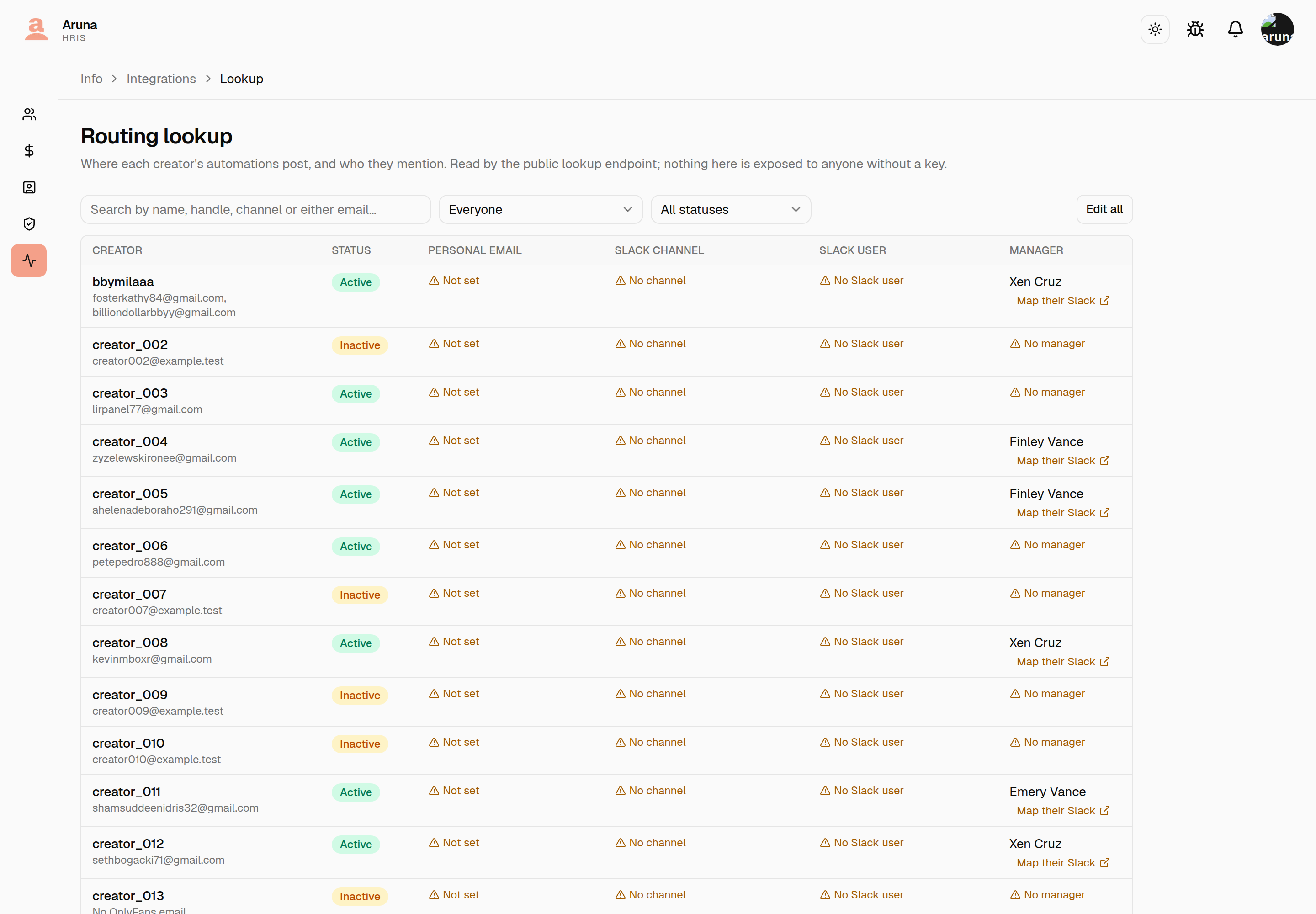
A creator's own record can set her routing one at a time. What this page adds is the question her record can't answer: who is still unmapped. That's why every missing piece is called out in amber rather than left as an empty cell.
The filter is the tool. Beside the search box:
- Everyone — the whole roster.
- Anything missing — any creator with at least one gap. Start here.
- No Slack channel, No Slack user, No personal email — one gap at a time, for working through a backlog.
- No manager, or unmapped — she has nobody assigned today, or she has a manager whose own Slack account was never mapped. Two different problems, both of which stop a tool reaching a person.
Every creator is on this page, whatever her status — active, paused and offboarded alike. A creator who vanishes from the one screen built to find gaps is the failure this page exists to prevent: you could not check a paused creator's routing, or clear it when she left, and searching her name returned nothing at all. A Status column says which is which, and the All statuses filter narrows to one kind when that is what you want.
There is no paging. The whole matching set comes back at once — a gap on page three was a gap nobody found. This is a screen you work down, not one you browse.
A creator with two OnlyFans accounts shows both addresses
They are listed under her name, and the search matches either one.
Editing the table
Edit all turns every row into an editor at once. Fix what you need down the whole page, then Save once.
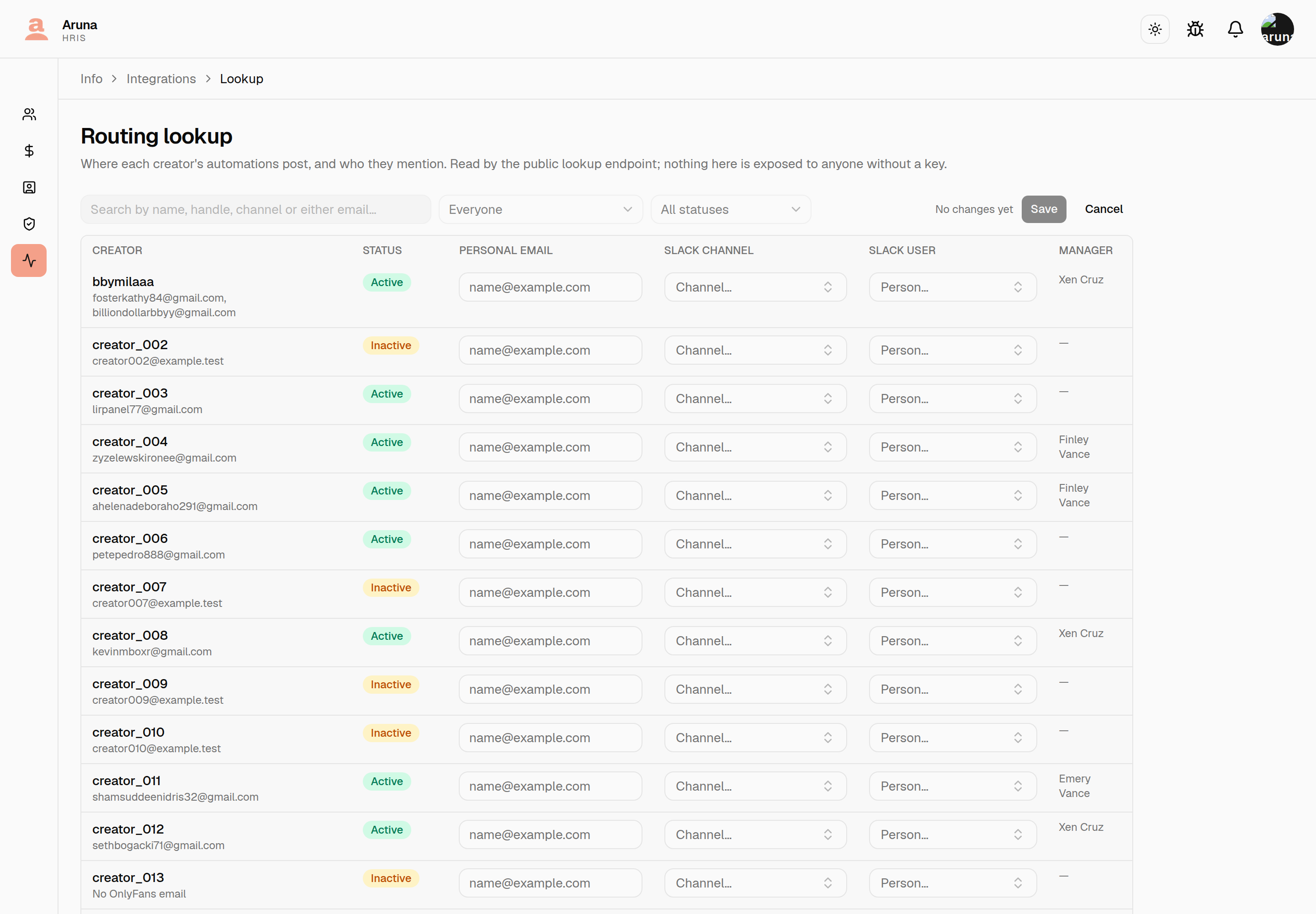
That is the whole point of it: working down fifty gaps used to be fifty open-save-close cycles, one row at a time.
- Save writes only the rows you actually changed, and the header says how many are pending — it reads No changes yet until one is.
- A row that fails to save says so on that row, and the rest still save. A duplicate email will not quietly take the others down with it.
- Cancel drops every unsaved change at once.
- A creator's name links to her full record, in a new tab — so you don't lose the filter and the page you were on.
- The Manager column is read-only here. It's an employee record, which belongs to P&C — Map their Slack opens Account mapping in a new tab, already filtered to that person and to the gap, so the box to fix is the first thing on screen.
A personal email can only belong to one creator
It's what the automations look her up by, so two creators sharing one would make the answer ambiguous. Saving a duplicate fails and names the other creator, rather than silently taking it from her.
3. Setting it on a creator's own record
Everything on the lookup page is also on her record, under Local controls → Slack routing. See Slack routing on a model.
4. Mapping a talent manager
A manager's Slack account is set on the P&C side, not here, and needs the People & Culture module. Either on their own record, or — for several at once — on Account mapping, which also lists who is still missing one.
This is deliberate: editing the creators and editing the staff are two different permissions, and whoever does this wiring usually holds both.
5. What an integration calls
GET /api/public/v1/lookup/model/?of_email=<address>
GET /api/public/v1/lookup/model/?personal_email=<address>
Give one of the two addresses — the OnlyFans one or the personal one. The key needs the Routing lookup API module; see API keys & the public API.
{
  "count": 1,
  "results": [
    {
      "id": "06ac8807-…",
      "username": "creator_049",
      "slack_channel": "model-creator-049",
      "slack_channel_id": "C01ABCDE",
      "slack_member_id": "U02FGHIJ",
      "manager": {
        "employee_id": "06a55c98-…",
        "name": "Bailey Fairchild",
        "slack_member_id": "U03KLMNO"
      },
      "manager_missing": null,
      "former_manager": null
    }
  ]
}
Things worth knowing before you build against it:
- No email address comes back — not hers, not her manager's. You supplied the address; the response is ids.
- Matching is exact and case-insensitive. There is no partial or prefix match, and this endpoint cannot list the roster.
- A blank value is a
400, not everything.?personal_email=with an unset template variable fails loudly instead of returning the first creator. - Paused and offboarded creators still resolve. A creator who quietly returns nothing is the failure this replaced.
countcan be 2. Two creators can legitimately share an OnlyFans address, because that address belongs to OnlyFans and nothing here can stop it. You get both rows and decide; nothing guesses.-
A missing manager is reported, not fatal:
manager_missing: "no_open_assignment"— nobody manages her today.manager_missing: "no_slack_mapping"— somebody does, but their Slack account was never mapped.
Both come back as a normal
200with the creator's own routing intact. A404would have made either look like a missing creator. -
When nobody manages her,
former_managernames whoever did last, so a tool with nobody to mention still has somebody to ask:json "manager": null, "manager_missing": "no_open_assignment", "former_manager": { "employee_id": "9e0f1a2b-…", "name": "Dana Okafor", "slack_member_id": "U07MANAGER2", "ended_on": "2026-10-17" }ended_onis the inclusive last day they had her, and it is the field that makes this usable: her manager until four days ago is worth messaging, her manager until March is not, and only you know where that line sits.It is filled only when
manager_missingisno_open_assignment— never alongside amanager, and deliberately not onno_slack_mapping. Somebody does own her in that case, and naming a previous manager would point you at the wrong person; the fix there is mapping the current manager's Slack account. So you read one or the other and never both.nullfor a creator who has never had a manager.
Troubleshooting
count: 0 for an address I can see in HRIS.
Check which address you sent. of_email matches her OnlyFans account
email; personal_email matches the one on her record — they're different
fields and a creator can have one without the other. The lookup page's No
personal email filter shows who has none.
403 on the lookup.
The key wasn't granted the Routing lookup module. A key's modules are fixed
when it's issued — revoke it and issue another. A 403 is never an empty
result: if you got 200 with count: 0, the key is fine and nothing matched.
The channel dropdowns are empty or disabled. HRIS can't reach Slack. Stored ids keep their names, and everything else on the record still saves — see Slack directory.
A channel shows "Not found in Slack". The id is still stored, but the channel no longer exists or the bot was removed from it. The row keeps the last known name rather than looking unset. Invite the bot back, or pick a different channel.
I changed her OnlyFans email and the lookup still finds the old one. HRIS refreshes that address on its nightly sync. Refresh profile on her record pulls it immediately.