Models / Agency Ops
Who this is for: staff who manage the agency's model roster and per-cutoff earnings sync. Time: ~4 minutes. You'll need: the Models module (the 🪪 icon in the left nav).
The Models area has three tabs. Overview totals revenue across a range of cutoffs, by platform and by model. Roster is the curated list of models the agency manages, with the per-cutoff refetch / lock controls that pull each model's OnlyFans earnings into the current period and the platforms each model is on. Income is the hand-entered revenue from platforms HRIS doesn't pull automatically. Every earnings figure, however it arrived, records who entered it and when.
1. Overview — revenue across a range of cutoffs
Opening Models lands here. Every other earnings screen answers "this model, this cutoff"; this one answers "what did we make between these two cutoffs", which used to mean opening each period and adding the numbers up by hand.
Pick a Year, then a From and a To cutoff. The range is continuous — it includes every cutoff between the two, whether or not you picked them — and everything below follows it. The four presets (This month, Last month, This quarter, Last 3 months) set both ends in one click; a preset with no complete cutoff inside its window is greyed out rather than doing nothing.
The range lives in the address bar, so a particular view is a link you can send someone.
Models
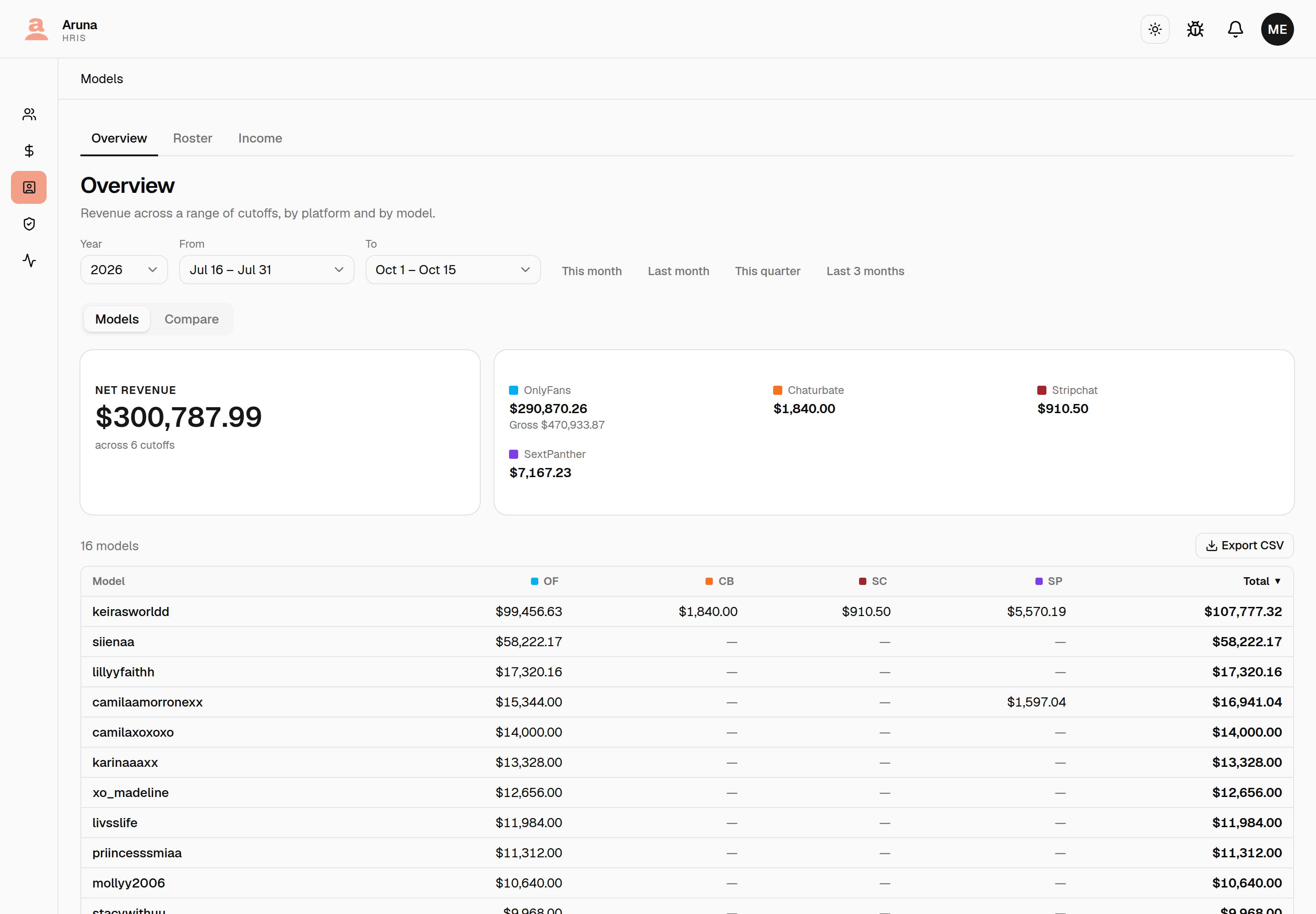
Net revenue is the headline: what reached the agency across the whole range. Beside it, each platform's own total.
Gross appears on OnlyFans and nowhere else, deliberately. OnlyFans is the only platform that reports one. SextPanther reports what it pays out, and a hand-entered income row is a single amount somebody typed — so there is no combined gross figure anywhere on this tab, because adding the three together under that word would invent a number for two of them.
The table below is one row per model, with a column per platform. Click any column heading to sort; click a model's name to open it. A dash means the model earned nothing on that platform in this range — not zero, but nothing recorded. Export CSV gives you exactly what is on screen, in the order it is on screen.
If any hand-entered income row straddles the edge of the range, a line above the table says how many were split pro-rata by day, so a derived figure never arrives looking like a measured one.
Compare
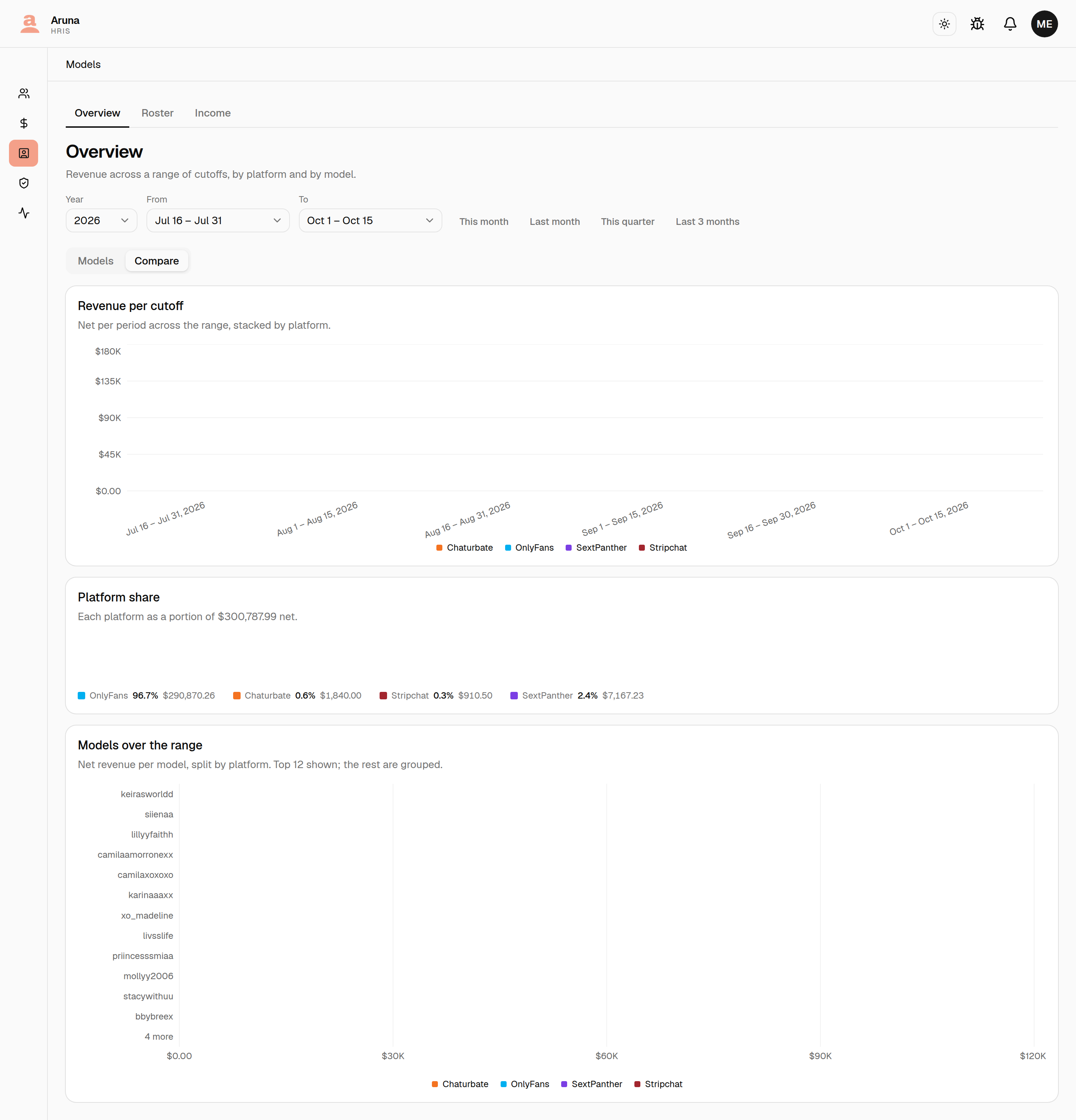
The same range, three ways:
| Card | What it compares |
|---|---|
| Revenue per cutoff | the periods against each other, stacked by platform |
| Platform share | each platform against the whole range |
| Models over the range | models against each other, top 12, the rest grouped |
The bars share one scale so the periods stay comparable, which means a very small period beside a very large one is a sliver. That is the data, not a bug — hover any bar for the exact figure, or read it in the table on the Models tab.
OnlyFans
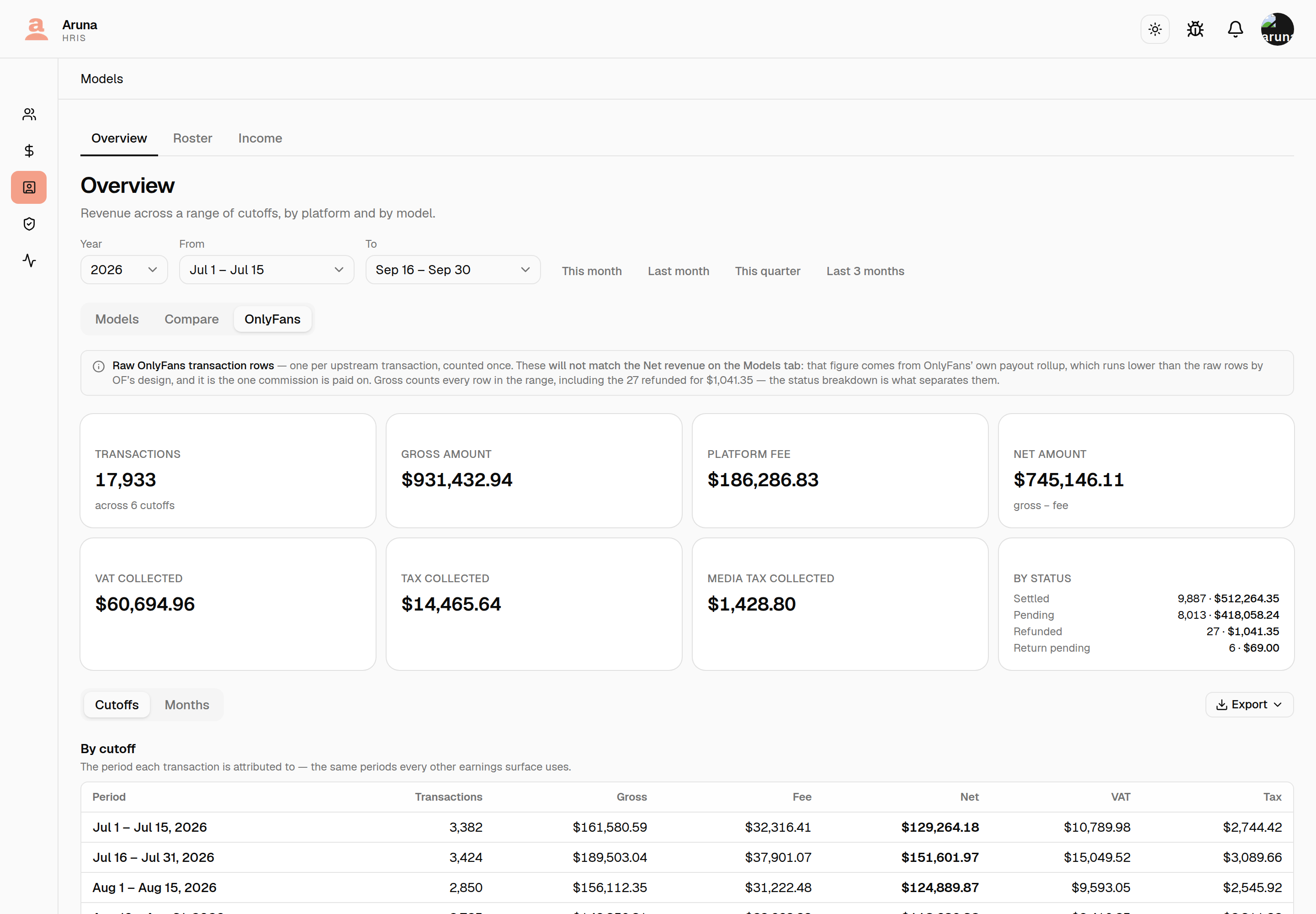
This tab answers a different question from the other two: what OnlyFans charged, collected and kept, transaction by transaction, over the same range. It is the quarterly reconciliation that used to mean exporting transactions out of OF Manager, removing the duplicates and pivoting them by hand.
It will not match the Net revenue on the Models tab
The two count from different places, on purpose. Everything else in HRIS — commission, payouts, every other earnings screen — reads OnlyFans' own payout rollup. This tab reads the raw transaction rows, which run higher. The note above the figures says so on screen.
Use this tab to reconcile against OnlyFans. Use the Models tab for what the agency earned.
Refunds count into the gross. An OnlyFans refund arrives as a positive amount marked by its status, not as a negative one — so dropping those rows would produce a gross no export can reproduce. By status, beside the tiles, is what separates settled from pending, refunded and return pending.
Below the tiles, the same transactions three ways:
| Block | What it breaks down |
|---|---|
| By period | each cutoff, or each month — whichever unit you picked |
| By model | every model that transacted, count and share of gross |
| By sales type | messages, tips, subscriptions and other |
Pick Cutoffs or Months before the dates — the toggle sits beside them and changes what they mean. On Cutoffs you choose two cutoffs, and the tab shows every transaction attributed to them, which is how every other earnings screen counts. On Months you choose two months, and it shows every transaction created in them.
Ask for the same span either way and the figures match. Months are cut on the agency's own day — the same midnight a cutoff starts on — so a transaction made late in the evening lands in the same period under both. July as two cutoffs and July as one month are the same rows.
They can still differ, in one case: a cutoff span with no month equivalent. Cutoffs are pickable in half-month steps, so Jul 16 – Sep 15 is a real selection that no pair of months expresses. The unit decides the dates for exactly that reason — it sets which spans can be asked for, not just how the table is labelled.
A share smaller than a tenth of a percent reads <0.1% rather than rounding to
zero, so a model who earned a little never looks like a model who earned
nothing.
Export offers two. CSV puts every block in one file, in the order they appear on screen. PDF renders the branded report — the same brand as a payslip. Both carry the unit and range on screen, so an export can never show a breakdown you did not ask for.
2. The roster
Open Models, then the Roster tab.
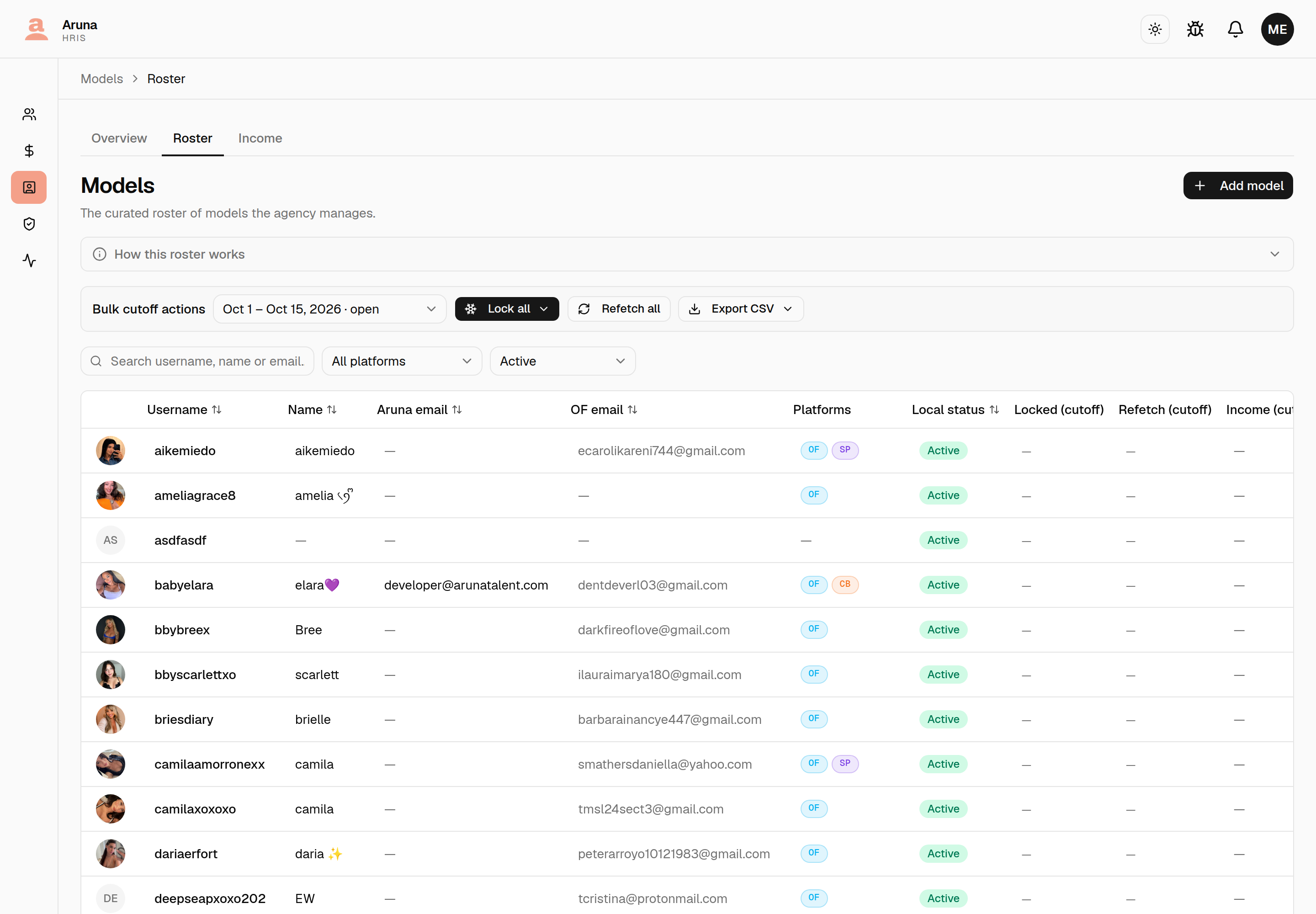
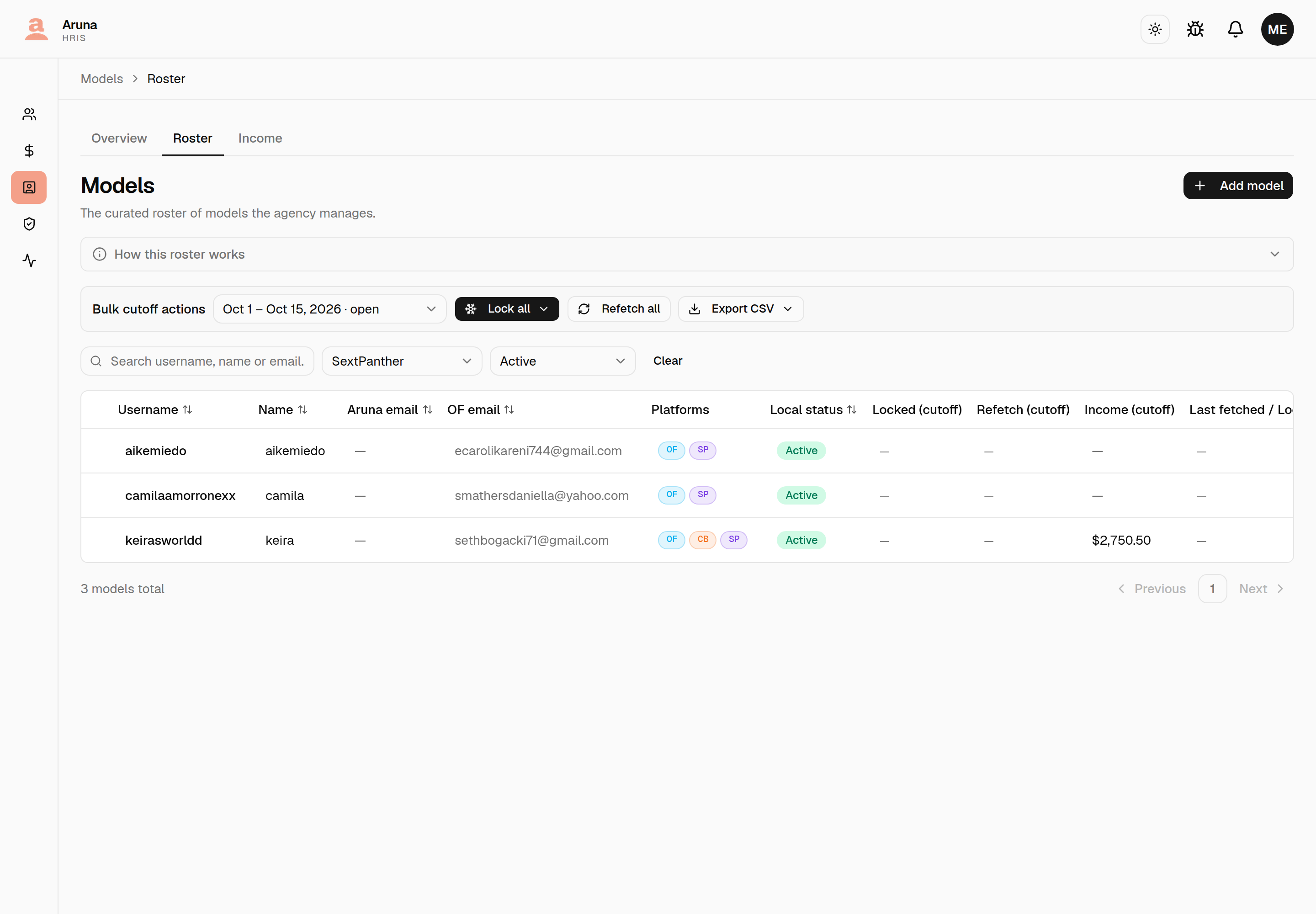
Each row shows the model's local status, the platforms they are currently on, its Locked and Refetch state for the selected cutoff, its Income for that cutoff (what's been entered under Income — OnlyFans earnings aren't in it), the upstream account, and last synced time. Search and filter at the top; pick the cutoff in Bulk cutoff actions.
Who is on which platform
The Platforms column badges every platform a model currently has an active
account on — OF, SP, CB and so on — so the answer is visible without
opening anybody. A dash means no platform accounts at all.
The dropdown beside the search box narrows the roster to one platform. It lists every platform, not just the ones somebody is using, because "nobody is on BongaCams" is an answer worth being able to get.
Detached accounts don't count. The column and the filter both mean currently active: an account that was removed is roster history, not somewhere the model is working now. See Platform accounts for adding and removing them.
The Upstream account column has three states, and they need different fixes — don't confuse them:
| Badge | What it means | What to do |
|---|---|---|
| Session active | The account is listed upstream and its session is live | Nothing |
| Session expired | The account still exists; its upstream session needs re-authing | Reconnect it upstream — not a Replace |
| Account gone | The account is no longer listed upstream at all. It can't be fetched, so the daily ingest skips it and the model has stopped earning | Replace it with the creator's new account |
| — | The model has no OnlyFans account | Nothing, or Attach one |
For a creator running two OnlyFans accounts this column reports her primary account's state. Open the model and check each row on Platform accounts — one account can be gone while the other is perfectly healthy.
This column is read live from the upstream roster, so it can disagree with the model's Last synced snapshot — an account whose session dropped yesterday shows Session expired here even though the row was last synced a week ago, when it was fine.
3. Add a model
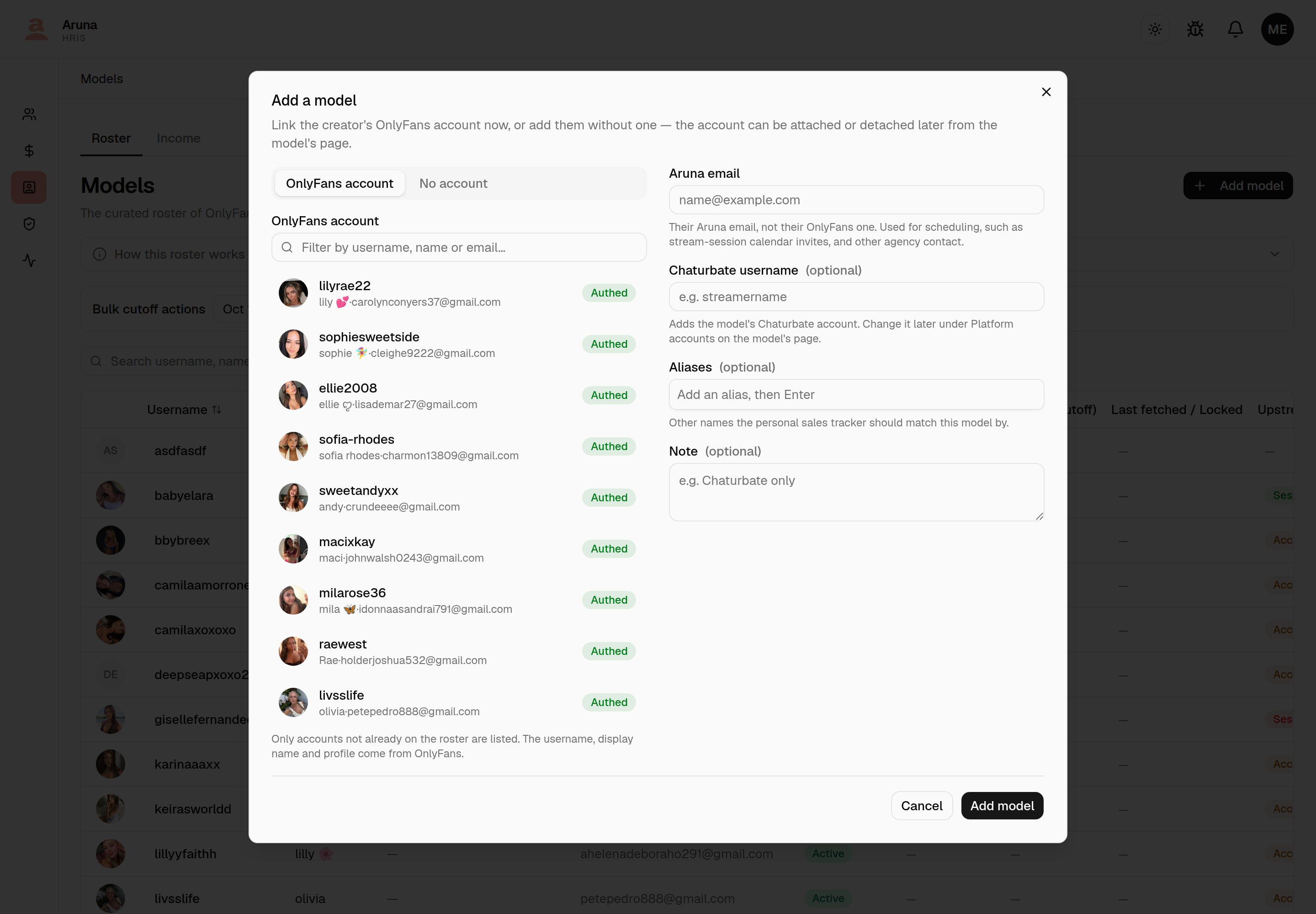
Every model joins the roster the same way: Add model (top right). The OnlyFans account is picked there, while you add the model — there's no separate import step.
The dialog has two tabs. OnlyFans account (the default) lists the upstream roster — filter by username, name or email, then click the account to select it. Only accounts not already on the roster are shown, and the username, display name and profile come from OnlyFans, so you don't type them.
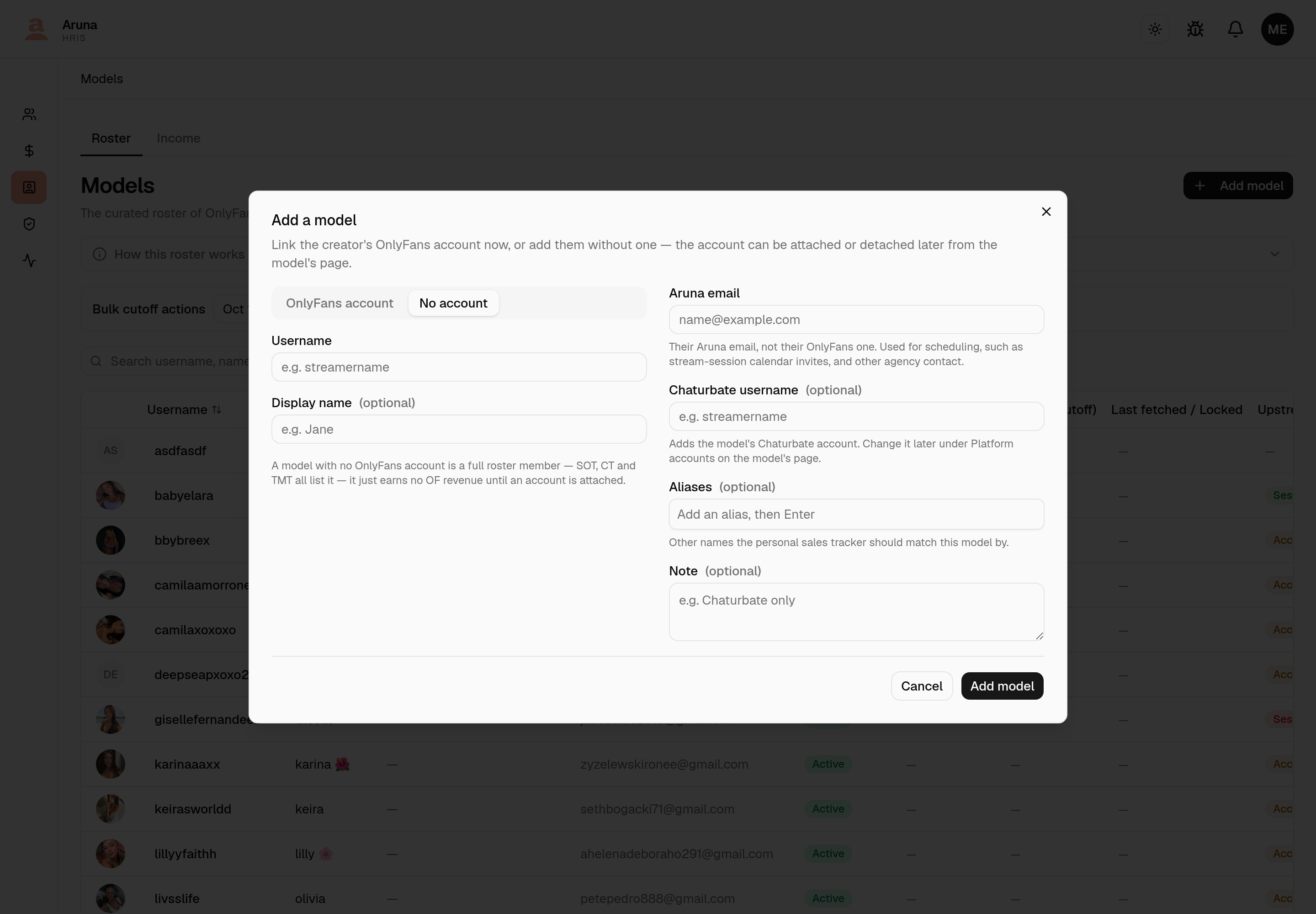
No account is for creators the agency works with outside OnlyFans, e.g. a stream-only model the SOT team schedules sessions for. Type a username (required — it's what shows in the SOT session model picker) and an optional display name.
Both tabs share:
- Aruna email (required) — see Aruna email below.
- Launch arm (required) — which setup she starts streaming on, MTS or Independent. There's no default: picking one is the decision this field exists to capture. See Launch arm.
- Chaturbate username (optional) — adds the model's Chaturbate account with that handle. Leave it blank if they aren't on Chaturbate; you can add or change it later under Platform accounts.
- Aliases (optional) — any other names the Personal Sales Tracker should match this model by. Type a name and press Enter to add each one; the PST matcher checks the username and these aliases when reconciling a pasted row.
- Note (optional) — free-form context (e.g. "Chaturbate only").
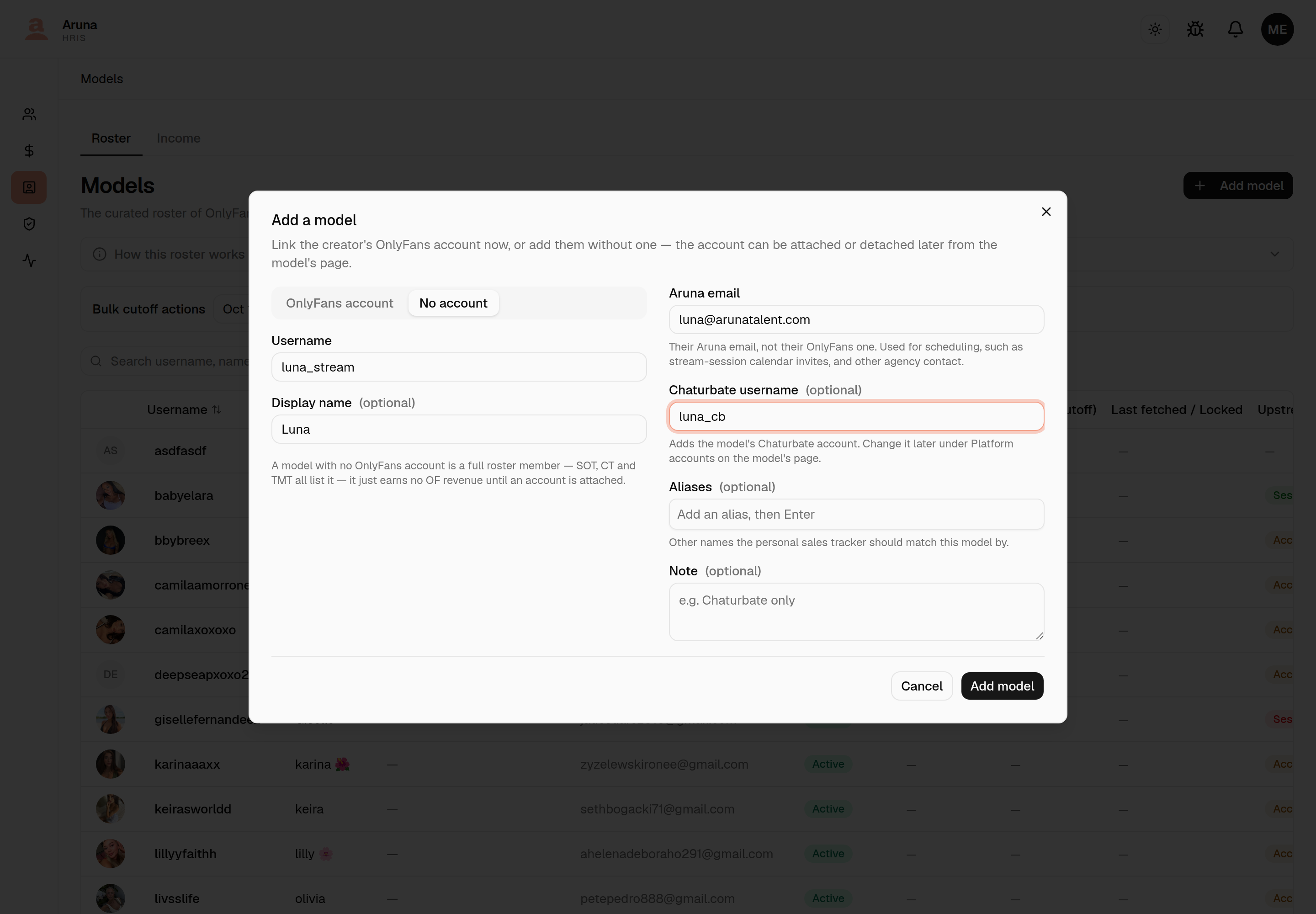
Add model saves it to the roster immediately. You can edit the Aruna email, aliases or note later from the model's detail page.
Aruna email
The model's Aruna email is the address the agency reaches them on. It's not their OnlyFans account email, which comes from OnlyFans and is overwritten on every sync. It's used for scheduling: SOT stream sessions invite the model at this address (see Google Calendar for stream sessions).
- Required when you add a model.
- Models added before the field existed have none until someone fills it in on their detail page. Until then they aren't invited to their sessions.
A model with no OnlyFans account is a full roster member — it shows in every picker: SOT scheduling, the leave-request assigned-model field, CT coverage teams and the TMT board. It just carries no OF earnings, so commission, retainer and affiliate pay compute zero for it until an account is attached, and its Refetch / Lock / Last synced columns stay blank. Coverage bonuses, which pay for showing up, are unaffected.
4. Attaching and detaching the OnlyFans account
The OnlyFans account is an attribute of a model, not the model itself — it can be linked and unlinked at any time from the model's detail page.
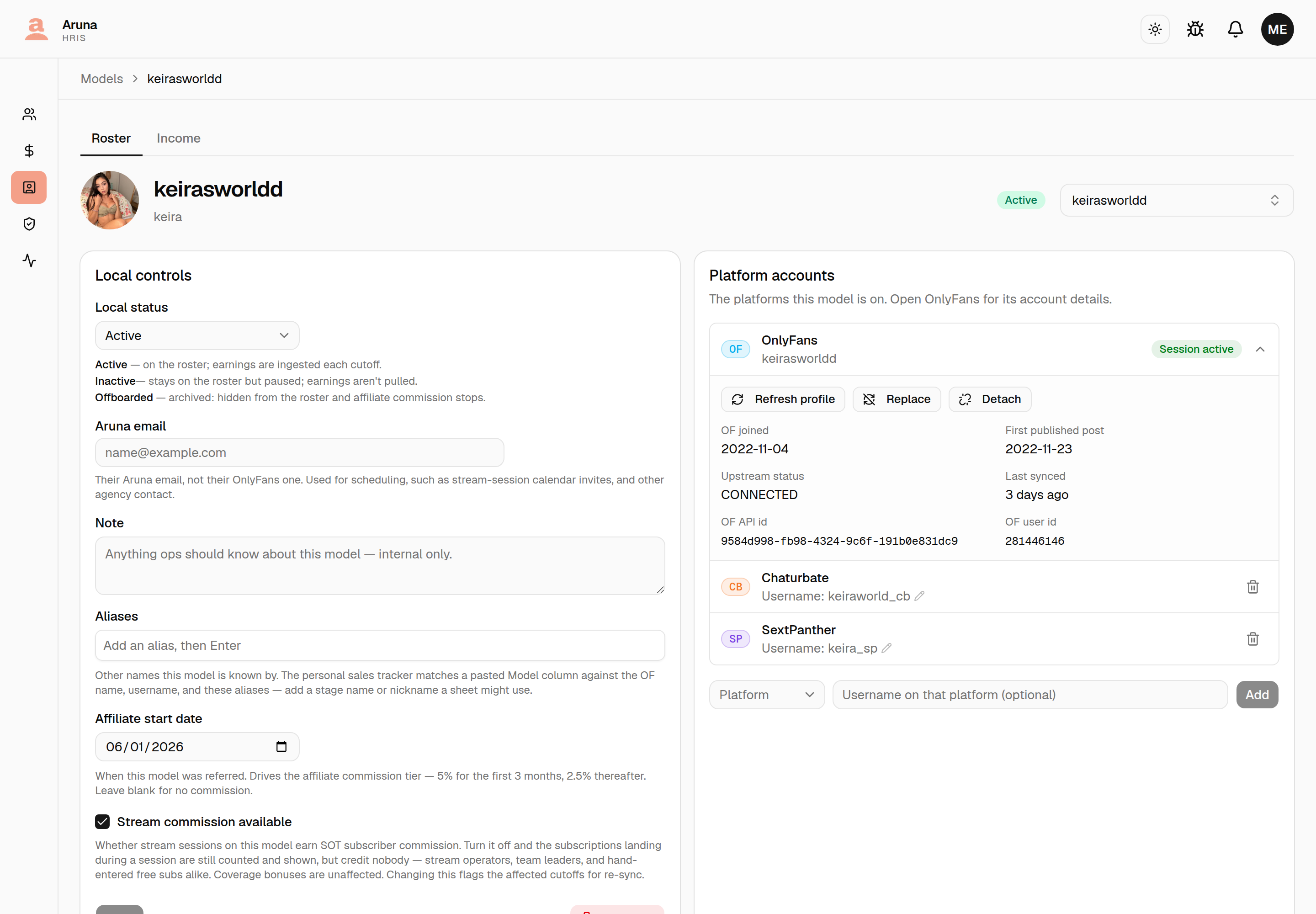
Everything about it lives in the OnlyFans row of the Platform accounts card on the model's page — click the row to open it.
Late registration. If a model with no account later signs up for OnlyFans, don't create a second model for her. Open the one she already has, click the OnlyFans · Not linked row and use Attach OnlyFans account to link the real account onto it. Only accounts not already on the roster are offered.
(This is a creator's first OnlyFans account. Adding a second one to a creator who already has one is a different thing, done from the Platform picker — see Platform accounts.)
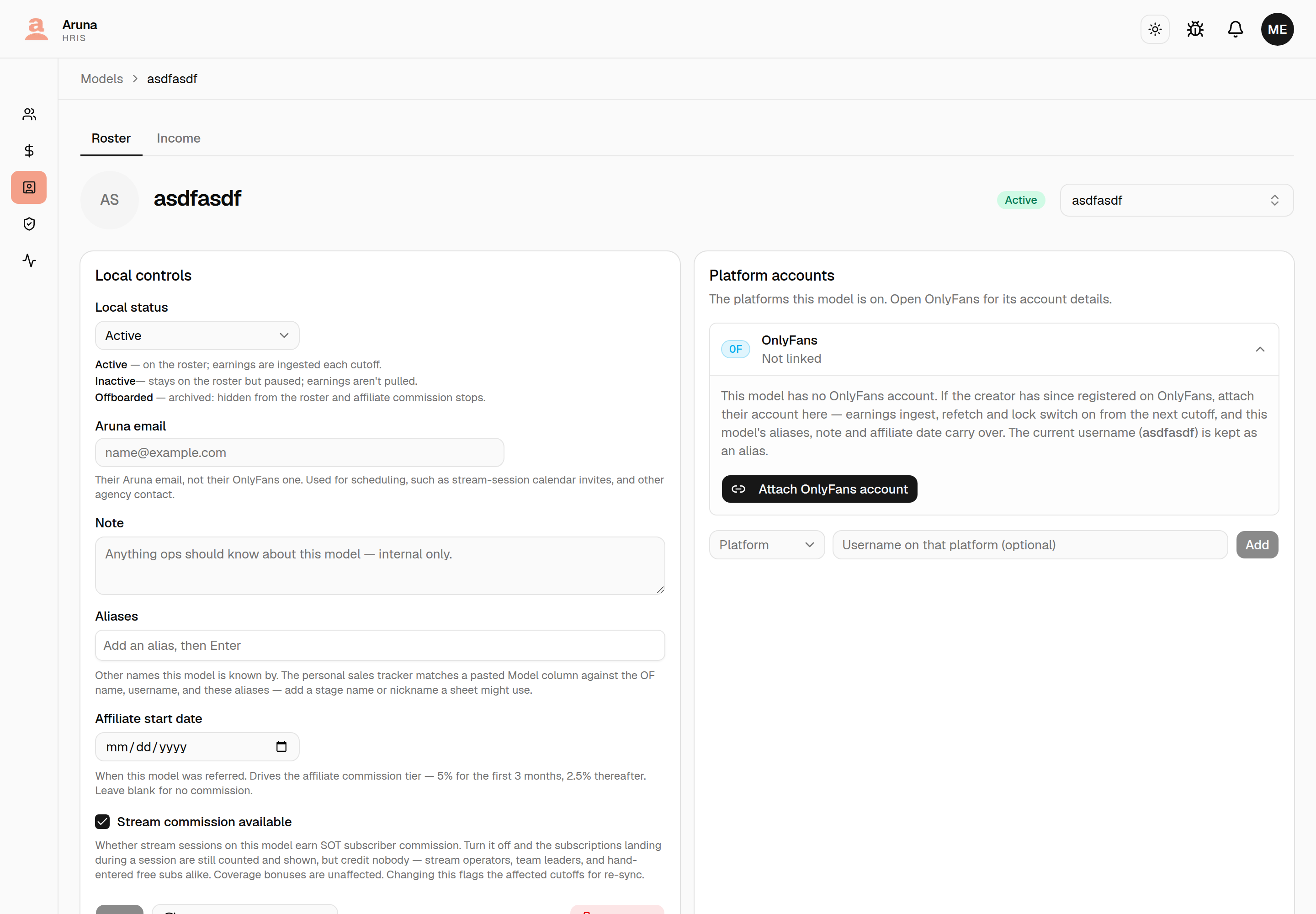
Once attached, the row starts earning: earnings ingest, refetch and lock switch on from the next cutoff, and CT commission, retainer and affiliate pay stop computing zero for it. The model's aliases, note, affiliate date and SOT schedule all carry over, and the old username is kept as an alias so the Personal Sales Tracker still matches it.
Wrong account linked? Detach (in the opened OnlyFans row) unlinks it and reverts the row to a model with no account, freeing that OnlyFans account to be attached elsewhere. It works on any model with an account, however it got one — but it's a corrective action only, so it's blocked once any cutoff has been locked or earnings ingested for the row. The username and aliases stay put.
The creator moved to a new OnlyFans account
Different situation, different button. When a model's account is gone — banned, deactivated, access lost — and the creator comes back on a new account, you don't want Detach (it'll refuse, because the model has earnings) and you don't want a second row (it would split the creator in two). Use Replace, next to Detach in the opened OnlyFans row.
Replace keeps this model and everything hanging off it — earnings history, aliases, note, affiliate date, SOT schedule, TMT and CT assignments — and just points it at the new account. The old handle is kept as an alias. Add a reason (e.g. "account banned") and it's stored on the model's account-change record.
The trade: cutoffs that closed before the replacement can no longer be refetched or locked-with-fetch. Their figures came from the old account, and re-pulling one would fetch the new account's earnings into that old period — inflating its transactions and overwriting its day-stats. You can still Lock now on those cutoffs to seal what's already stored. The period the replacement happens in legitimately mixes both accounts.
Afterwards the OnlyFans row shows "Account replaced on <date>", which is why an older cutoff will refuse a refetch.
Replaced the wrong one? Undo
That same note carries an Undo button. It puts the previous account back and lifts the seal, so the earlier cutoffs are refetchable again. It restores from the change record rather than from OnlyFans, so it works even though the old account is gone upstream — which is the whole reason it exists, since you can't pick a dead account out of the list to swap back to manually.
Undo only reaches the most recent change (do it twice to walk back two), and it stops working once the replacement account has pulled any earnings — at that point the row holds figures from the new account, and pointing it back at the old one would leave them unattributable. Earnings are never touched either way, so nothing is lost while you decide.
5. Refetch & lock a cutoff
From Bulk cutoff actions, Refetch all re-pulls every model's earnings for the selected cutoff, and Lock all freezes them. Both run in the background and can take minutes — rows show Queued → Refetching… → done, and a Cancel all appears while a batch is running.
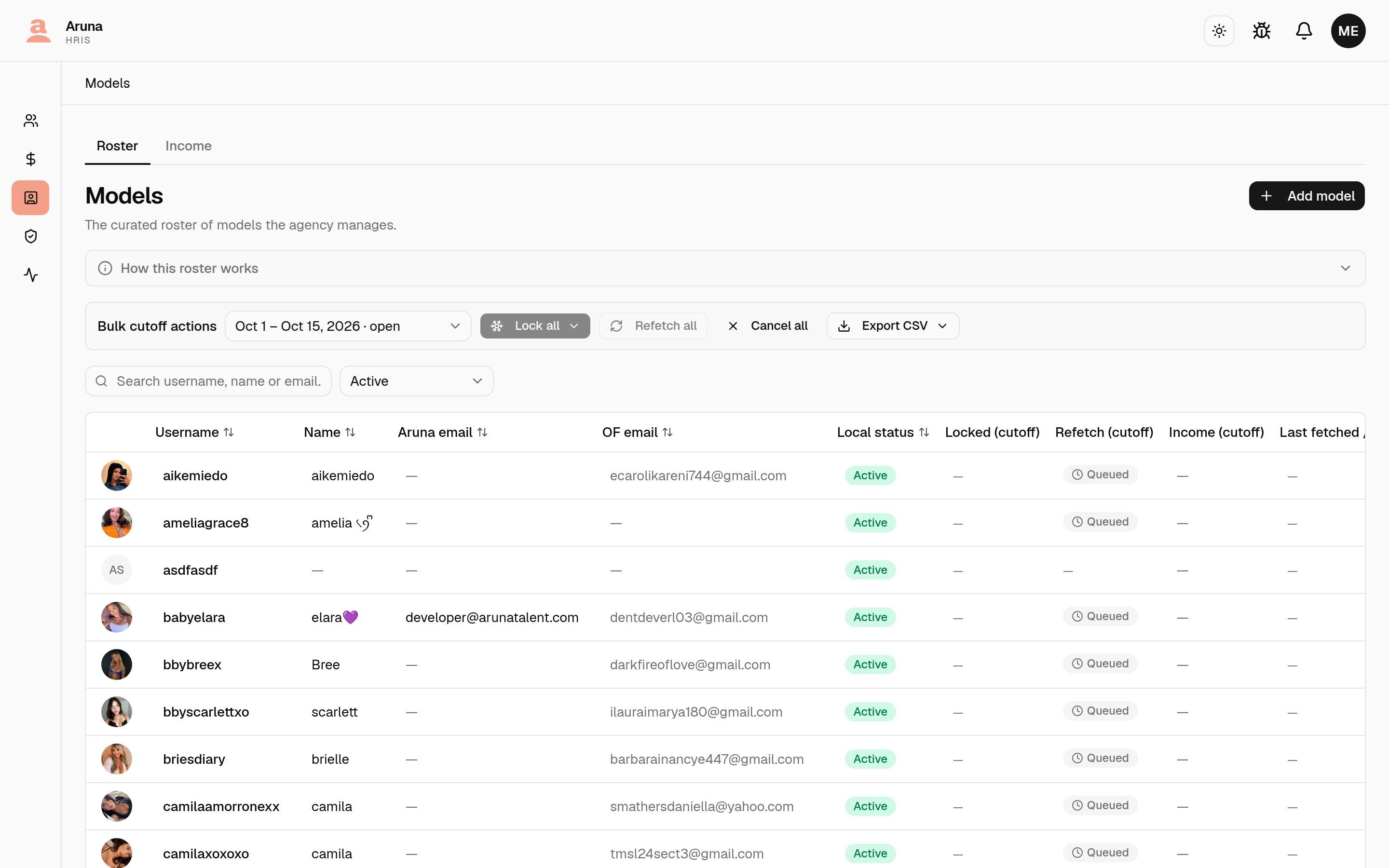
The Last synced time is the real pull time — trust it over the status pill if you're unsure whether a refetch finished. Freeze/refetch runs one model at a time behind the scenes, so a large batch takes a while.
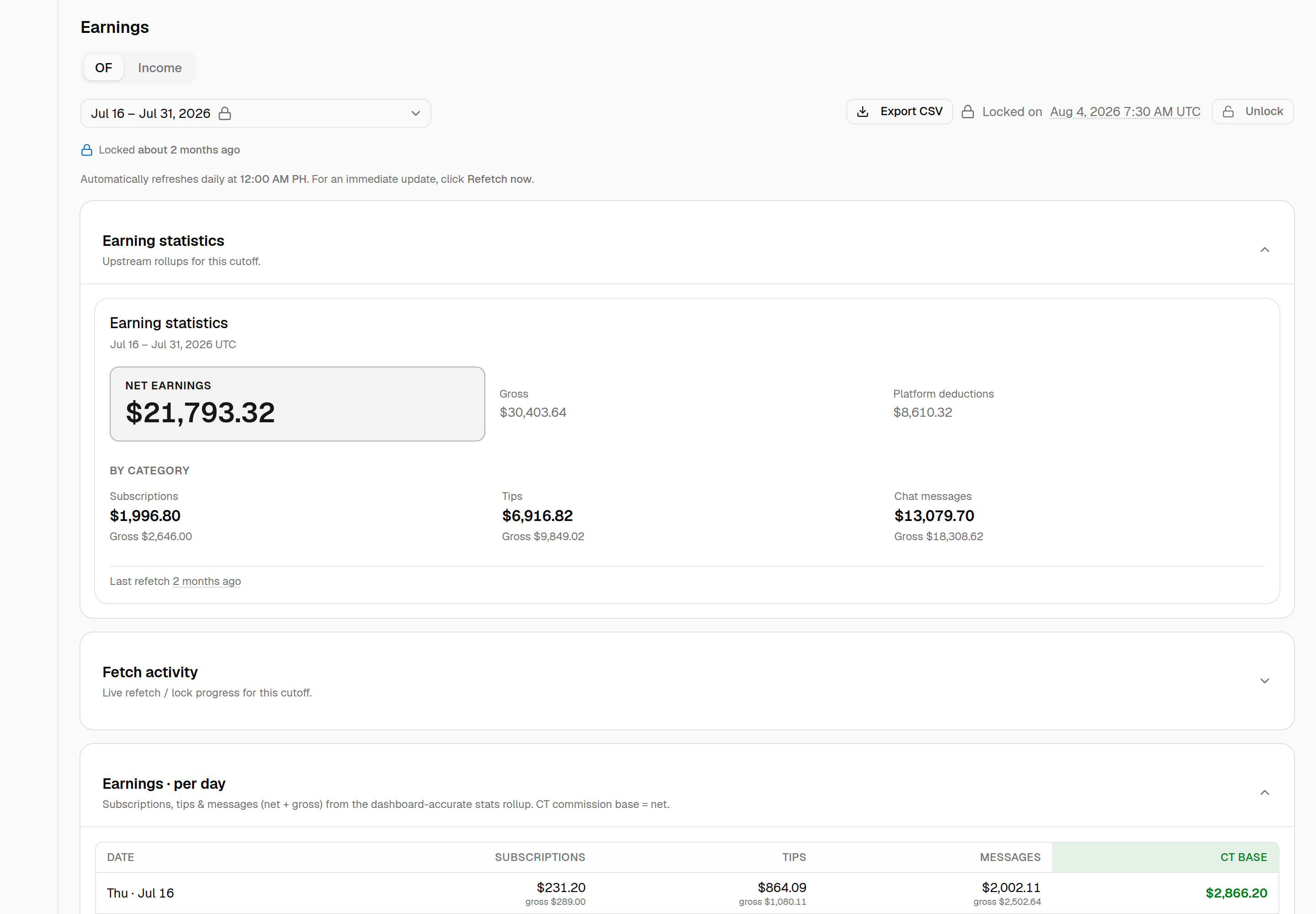
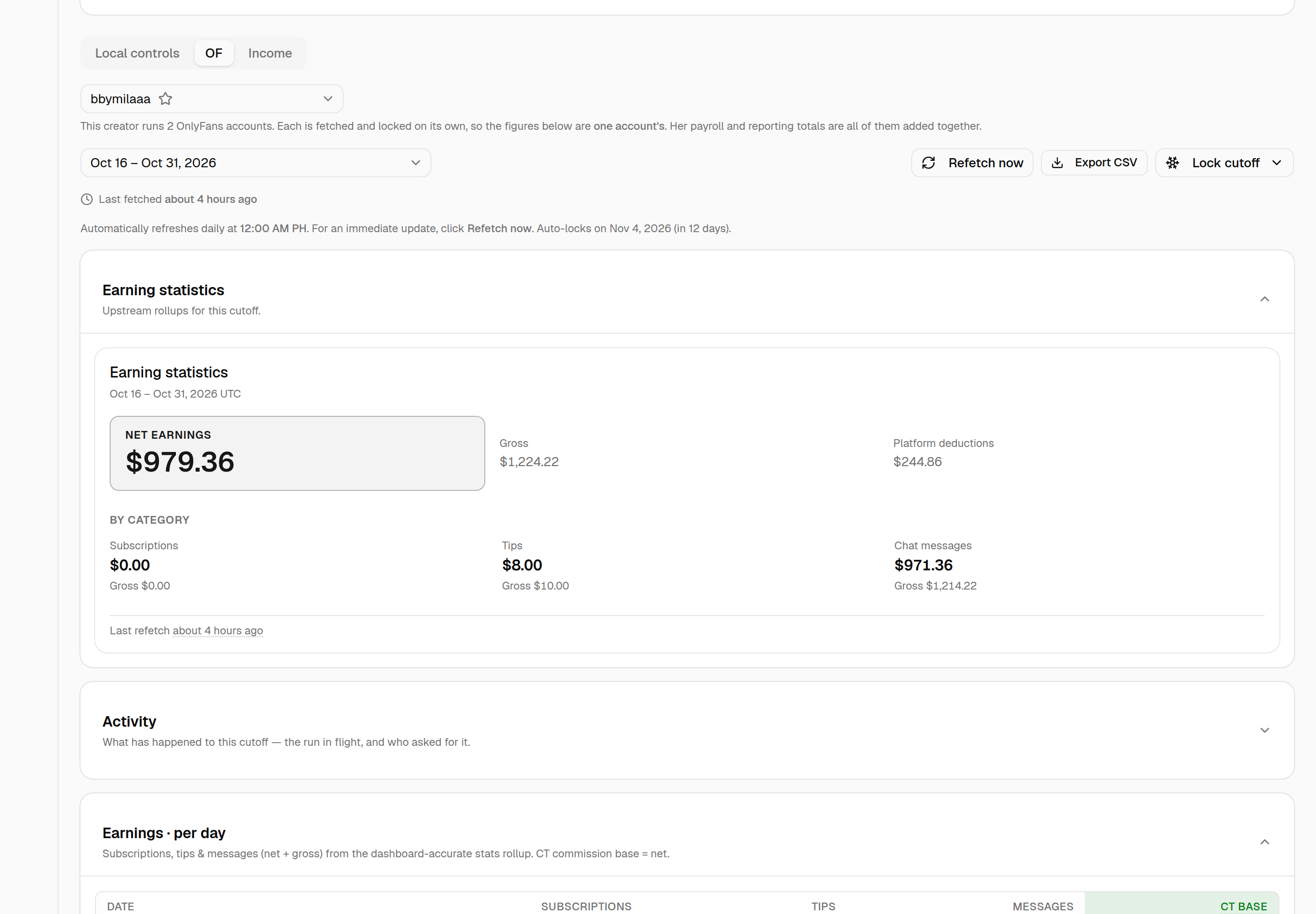
For one model, open its page and go to Earnings → OF. That tab has its own cutoff picker, Refetch now, Export CSV and Lock cutoff, above the earning statistics, fetch activity and the per-day table. It only appears for a model with an OnlyFans account.
6. Stream commission
A model's detail page has a Stream commission available tick box on the Local controls tab, under Commission. It's on for every model by default.
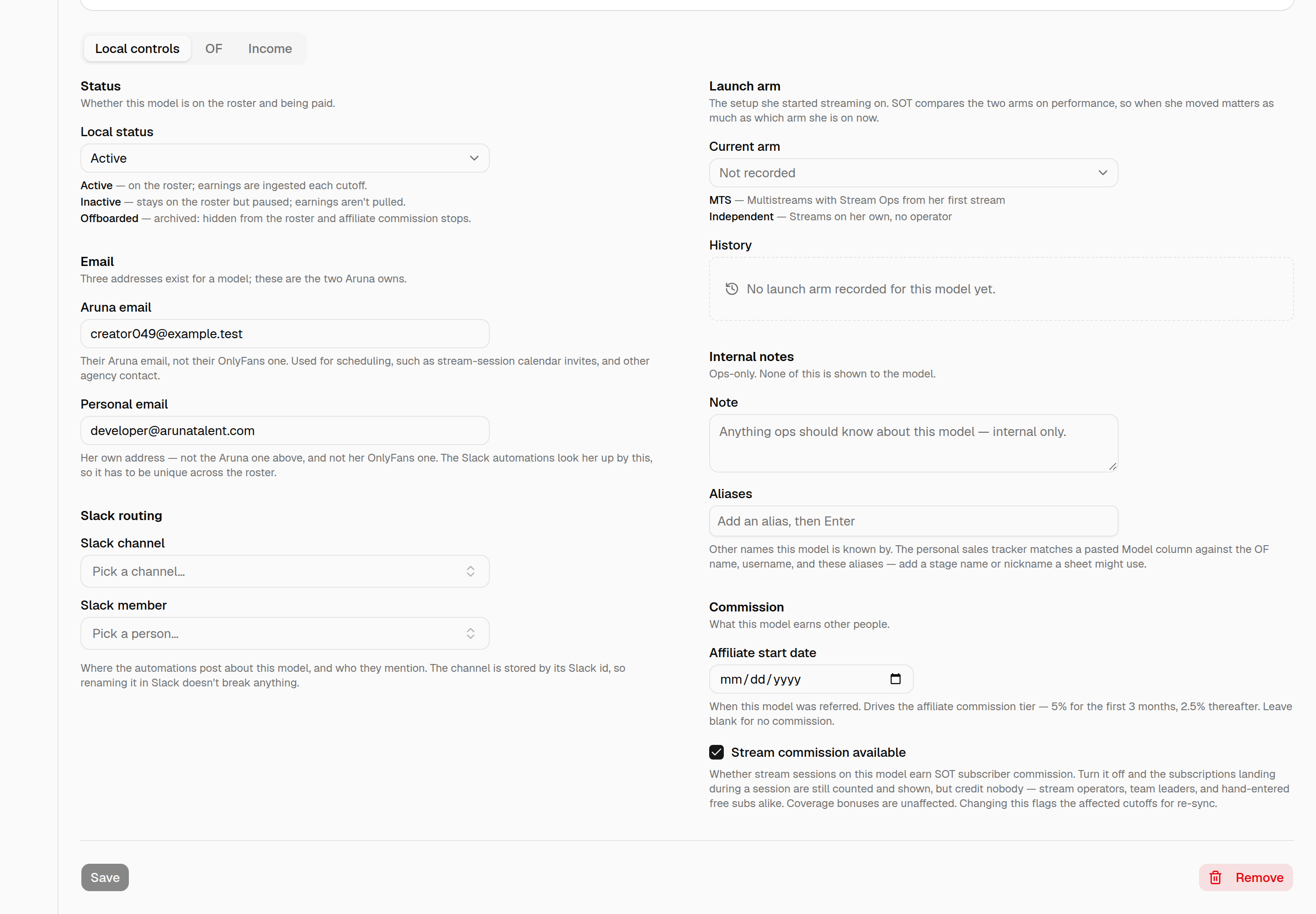
It decides one thing: whether stream sessions on this model earn SOT subscriber commission. Untick it for a model streamed under an arrangement that doesn't pay per subscriber.
With it off:
- The subscriber counts CT records for that model's sessions are still stored and still shown everywhere — the SOT Scheduling Hub, the CT sub-count board, and the Finance breakdown, which names the model and its count so a $0.00 row reads as a decision rather than a bug.
- But they credit nobody — neither stream operators nor team leaders.
- Coverage bonuses are unaffected. Those pay for covering a shift, not for the subs it landed.
Changing this moves money. Ticking or unticking flags the affected cutoffs for re-sync, and the change reaches draft payslips on the next Pull/Sync. Payslips already processed or sent keep their frozen amounts — if you're flipping this after a payroll has gone out, tell Finance.
7. Documents on a model
A model's detail page has a Documents section for record-keeping — for Talent Management / Finance to keep signed agreements, payment-transfer records, IDs, and similar files on the model.
- Give each file a name (separate from the filename), pick one file, and Upload. One at a time; each file is PDF, image, Word, Excel, or CSV, max 3 MB.
- Click a document to open it in a new tab, use the download icon to save a copy, or the trash icon to remove it (you'll be asked to confirm).
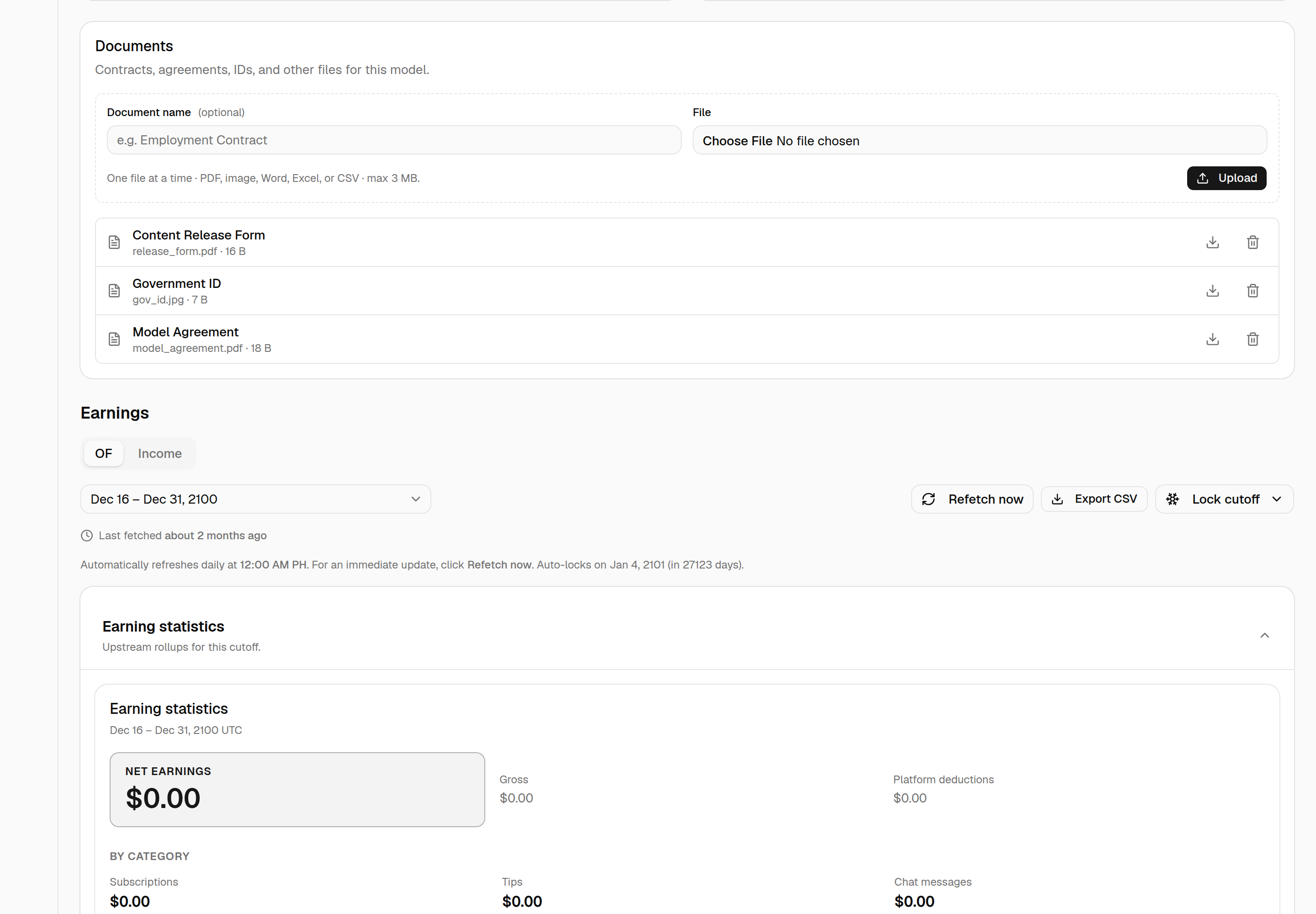
This is the same document management used on employee and external-contractor detail pages.
8. Platform accounts
A model can be on more than one platform — "SP Karina" is Karina on SextPanther. The Platform accounts card near the top of the model's page lists each platform the model is on.
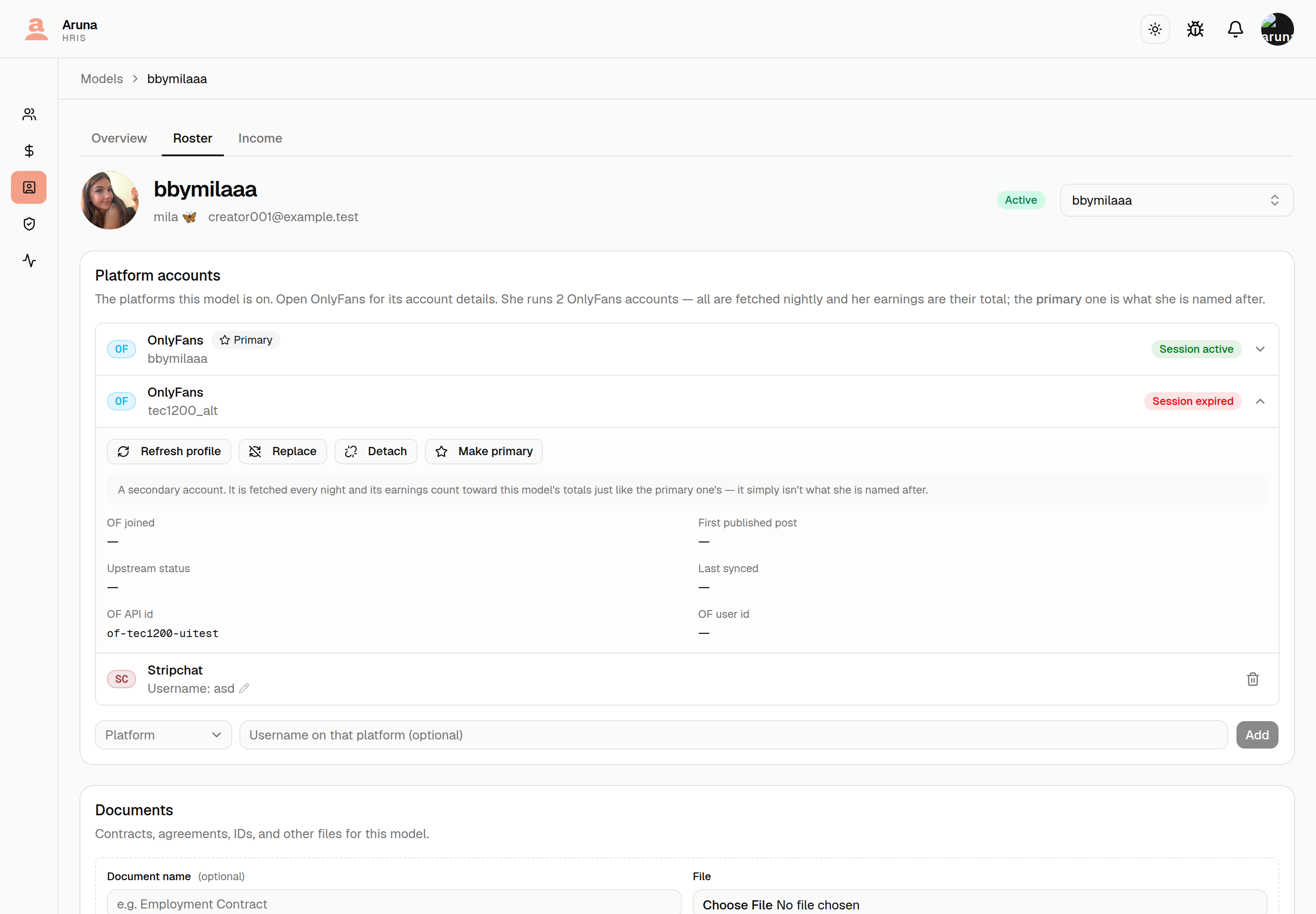
- OnlyFans comes first. It's the platform HRIS pulls earnings from, so click it to open the account: its Session badge, what OnlyFans last reported (join date, first post, status, last synced, the OF ids) and Refresh profile / Replace / Detach — see section 4. A model without an account shows Not linked, and opening it offers Attach.
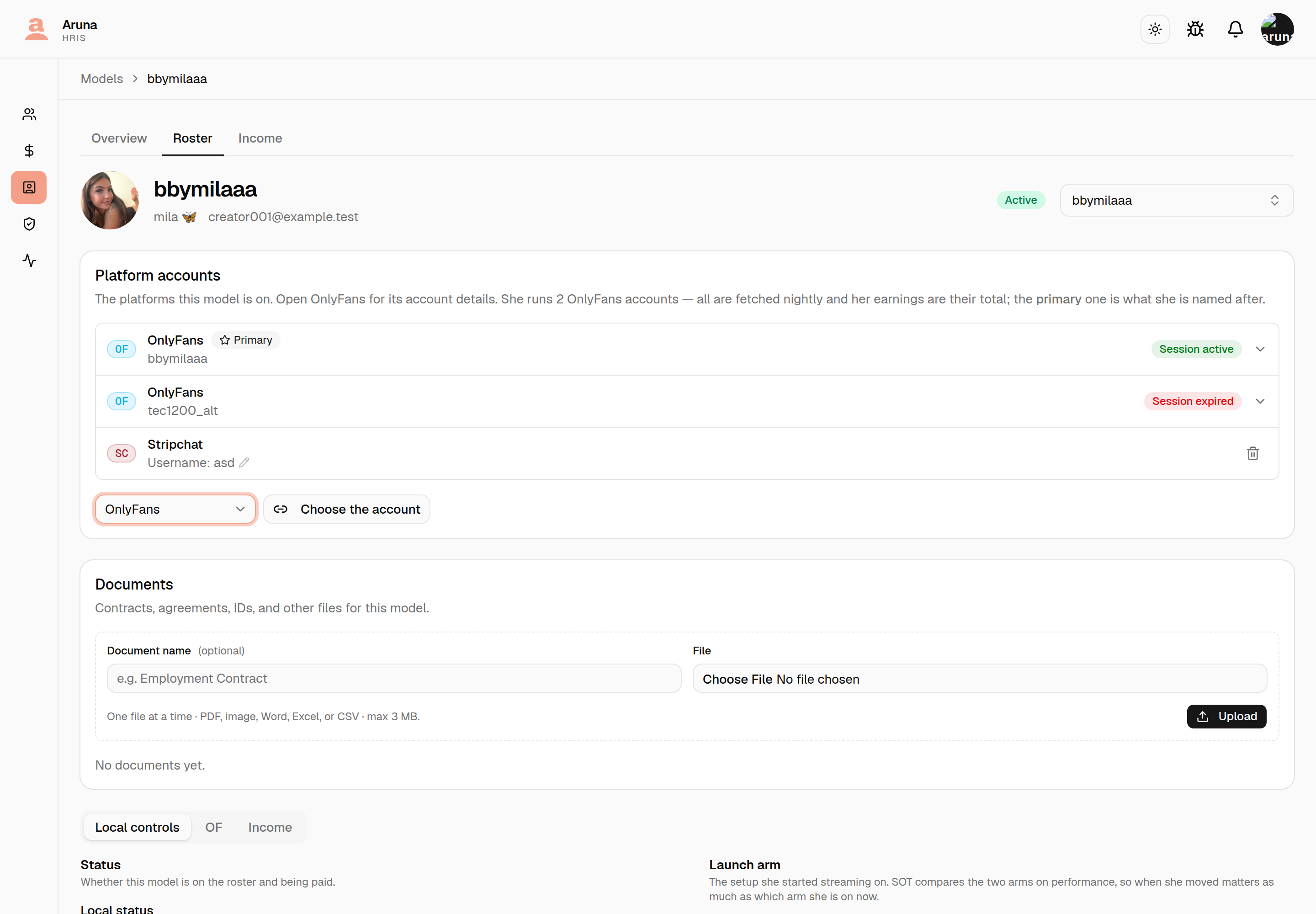
A creator can run more than one OnlyFans account. It's rare, but it happens, and HRIS supports it: each account gets its own row. Both are fetched every night, both are locked separately, and her earnings are the two added together everywhere a per-model figure is reported — payroll, the income reports, the CT commission base.
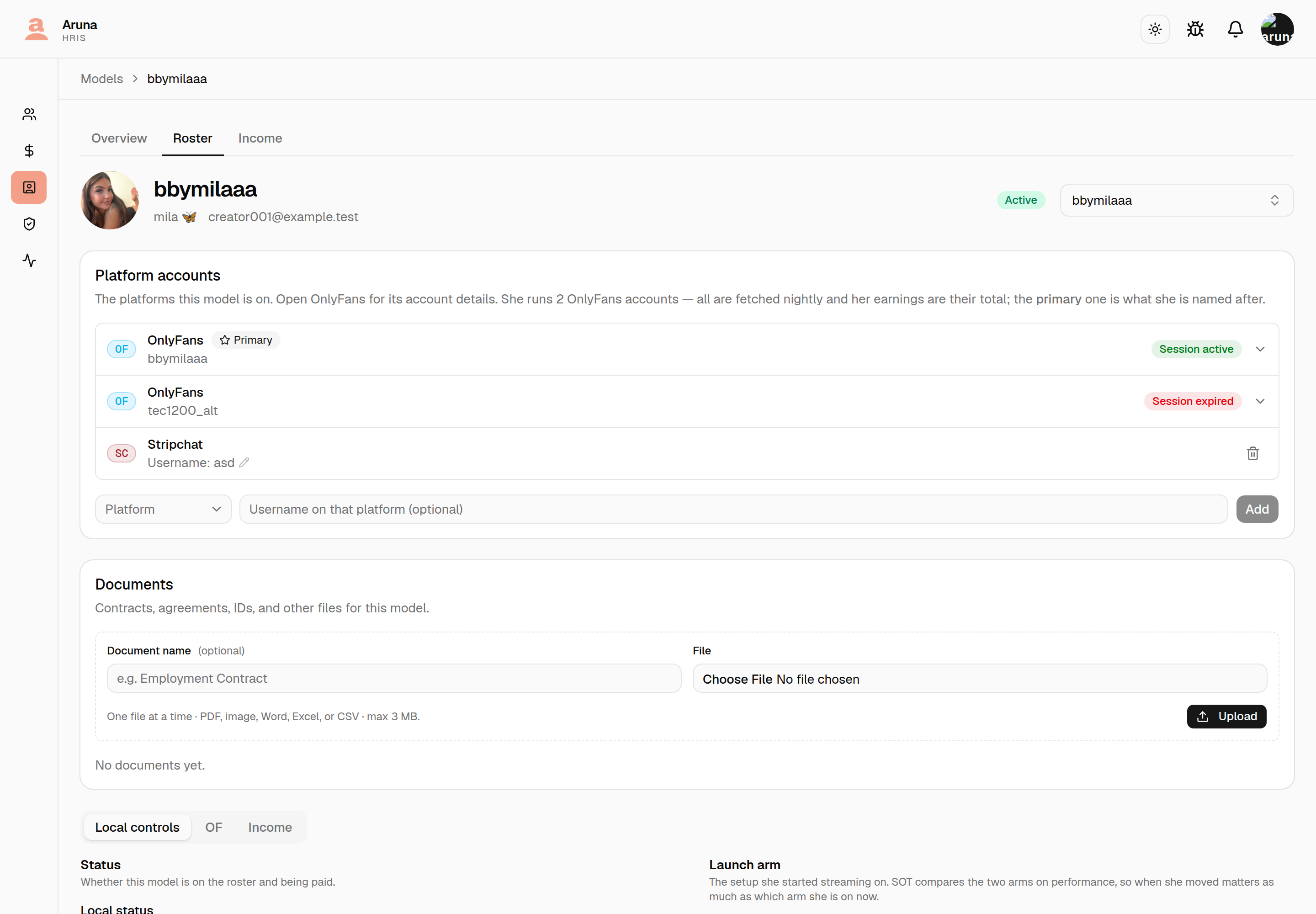
Two things follow from that, and they catch people out:
-
One account is the Primary, marked with a star. That's the account the model is named after — its handle, display name and avatar are what she is shown as on every screen, in exports, and in the Personal Sales Tracker's name matching. Make primary on the other account switches it, and the dialog spells out that this is a rename. The name she had is kept as an alias, so anything that still looks her up by it keeps working. Primary is about her name, not her money — both accounts earn either way.
-
Refetch and Lock are per account. The Earnings section gains an account picker, and what you see below it is that account's figures and that account's lock state. Locking one says nothing about the other, so a creator with two accounts needs both locked before her cutoff is sealed.
Adding the second account is done the same way as every other platform — from the Platform picker at the bottom of the card, not from a row. Choose OnlyFans there and the username field is replaced by Choose the account, because an OnlyFans account is a real upstream record rather than a name you type. OnlyFans only appears in that picker once the model already has one; a model with none attaches its first from the Not linked row above.
If her old account died and she moved to a new one, that is Replace, not a second account. Replace carries her earnings history across; adding a second account leaves the old one earning beside it.
Refresh profile re-reads those details from OnlyFans and restamps Last synced. It's the fix for a row that says "last synced 3 days ago" and gives you no way to act on it.
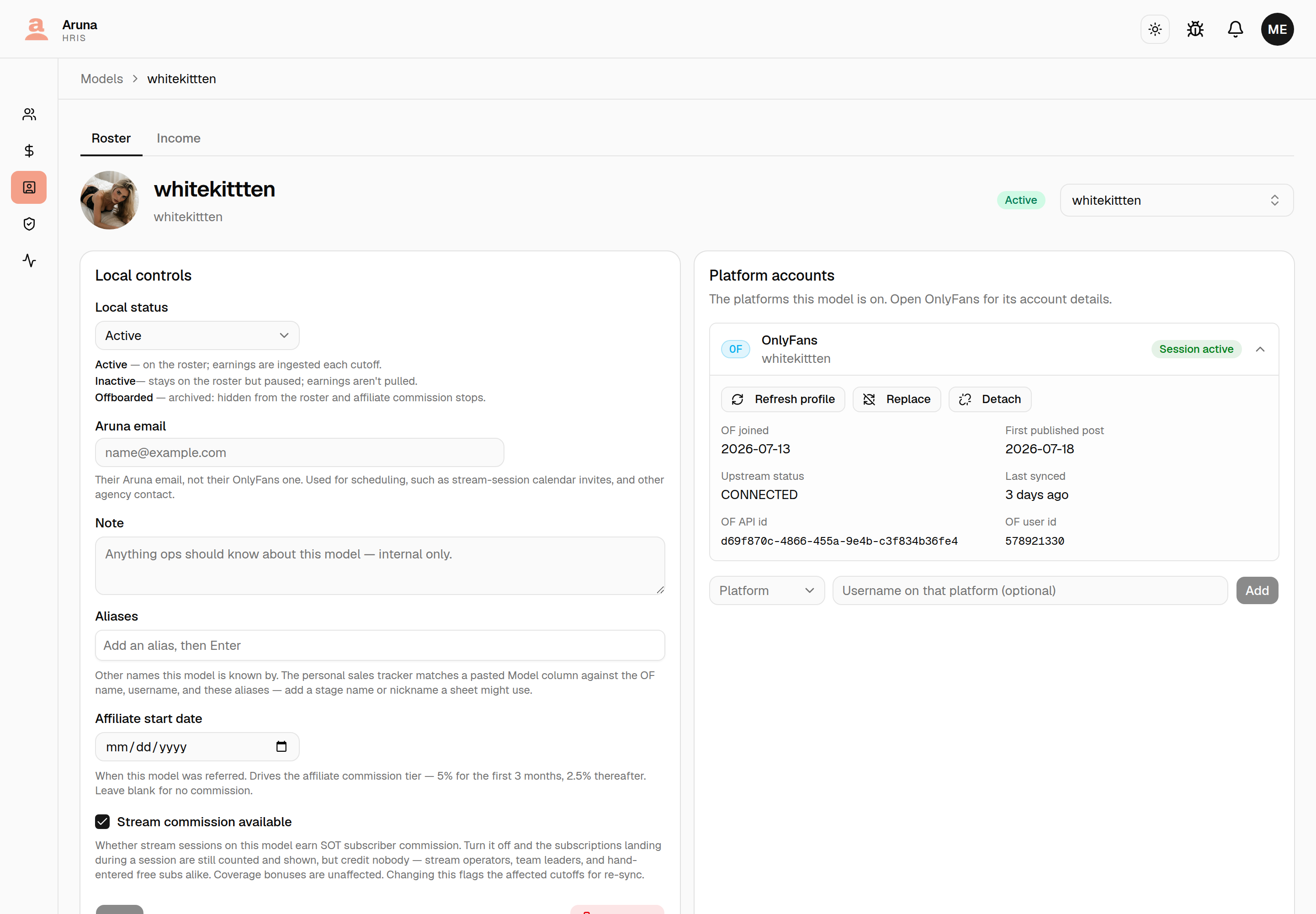
It can succeed and still come back partial. If OnlyFans can't answer for the profile — usually a disconnected session — the join date, first post and account ids keep the values already stored rather than blanking, and you're told the refresh was partial. Last synced still moves either way, so without that message you'd watch the timestamp update and never learn half the data didn't.
This is not the earnings refetch. That one is per cutoff and lives in the Earnings section; this one is the profile and has no cutoff. - Every other platform (Chaturbate, Stripchat, BongaCams, MyFreeCams, SextPanther) is added by hand: pick the platform, type their username there (optional) and click Add. Each row shows Username: … — click it (or the pencil) to change it. For Chaturbate this is the model's Chaturbate username, the same one asked for when adding the model.
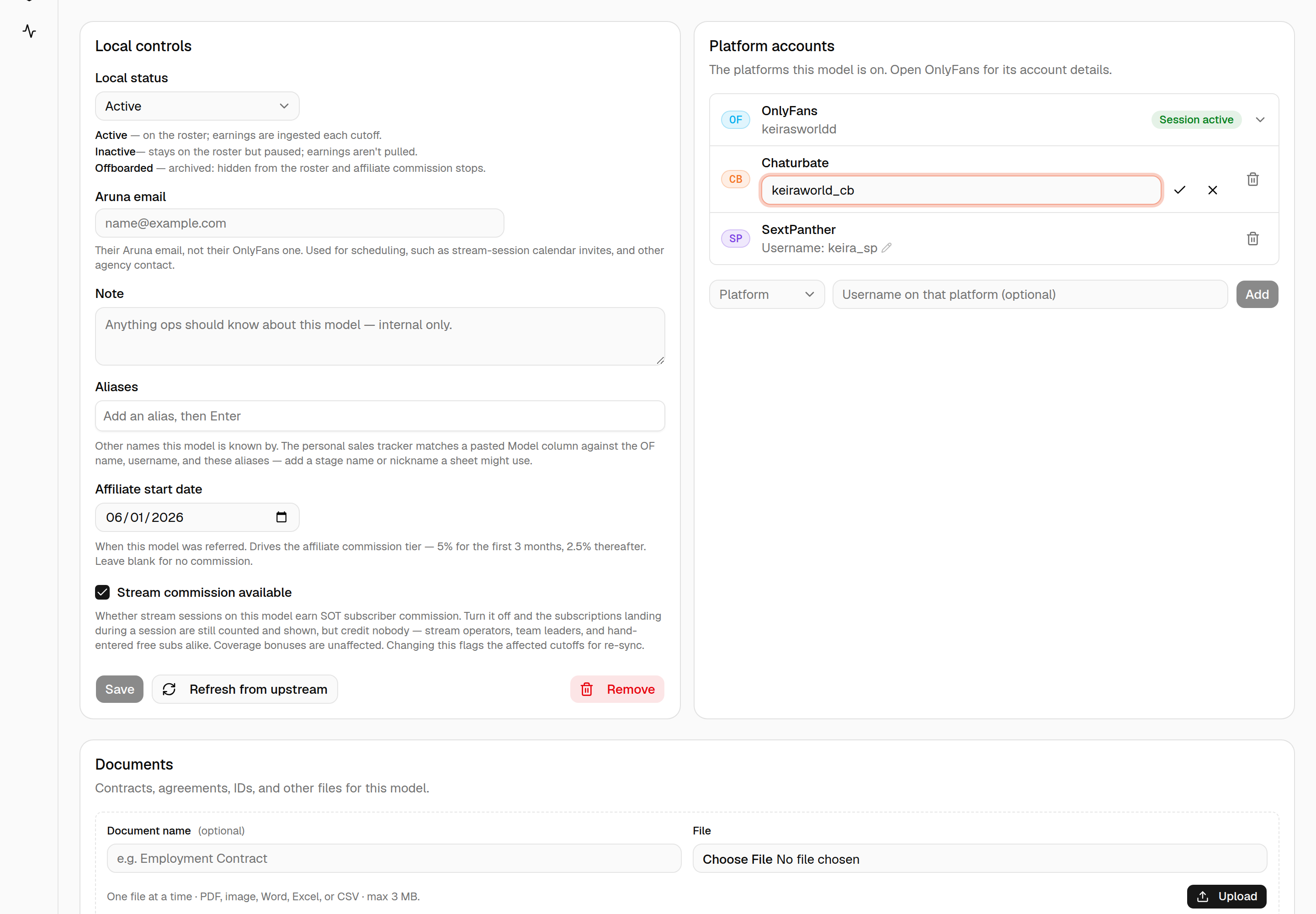
Adding a SextPanther account does one more thing: it turns on the SP tab in that model's Earnings section, where their daily figures are recorded — see section 10. Nothing else on the card behaves differently.
- The trash icon removes a platform from the model, after a confirm. It can be added again later.
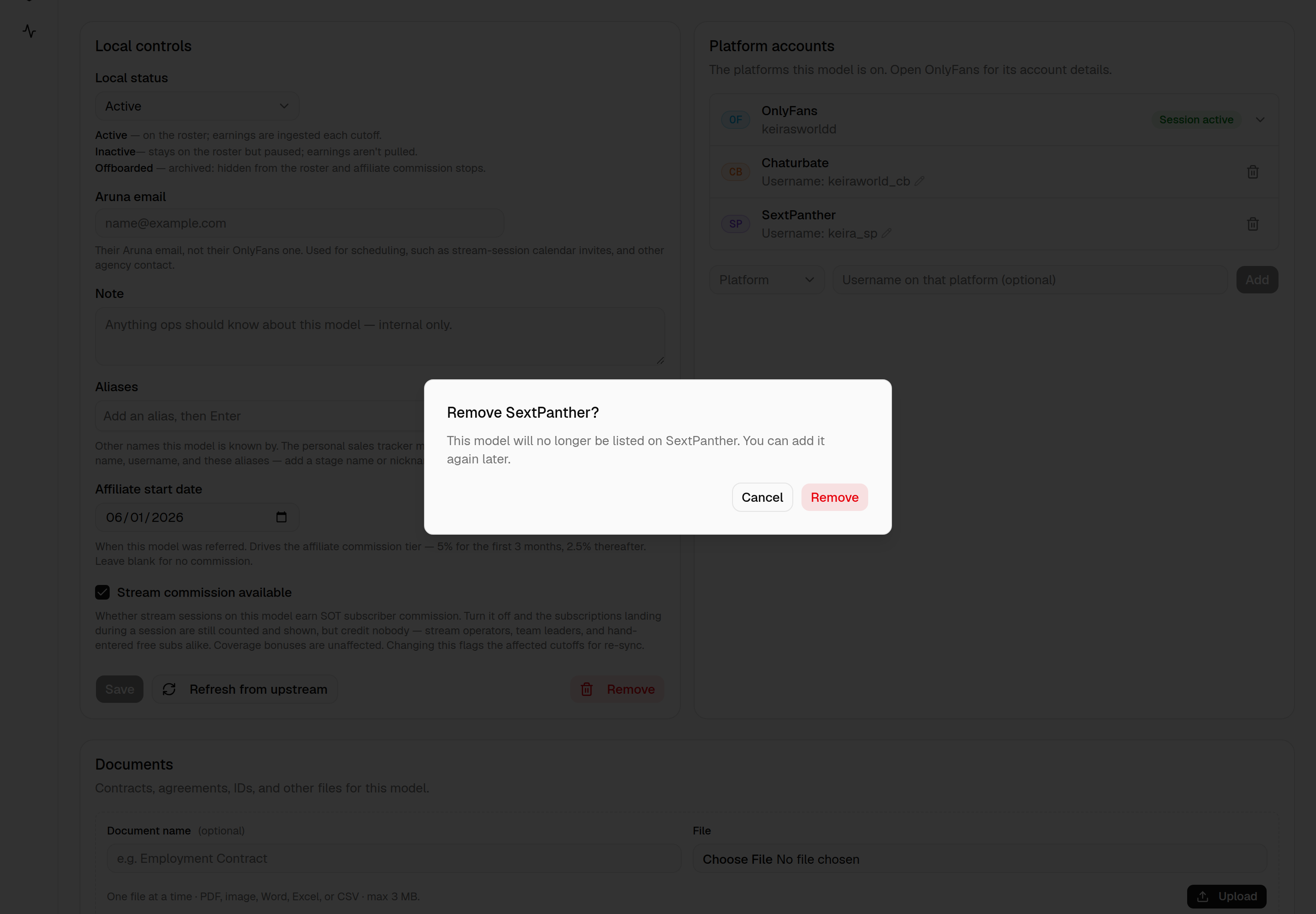
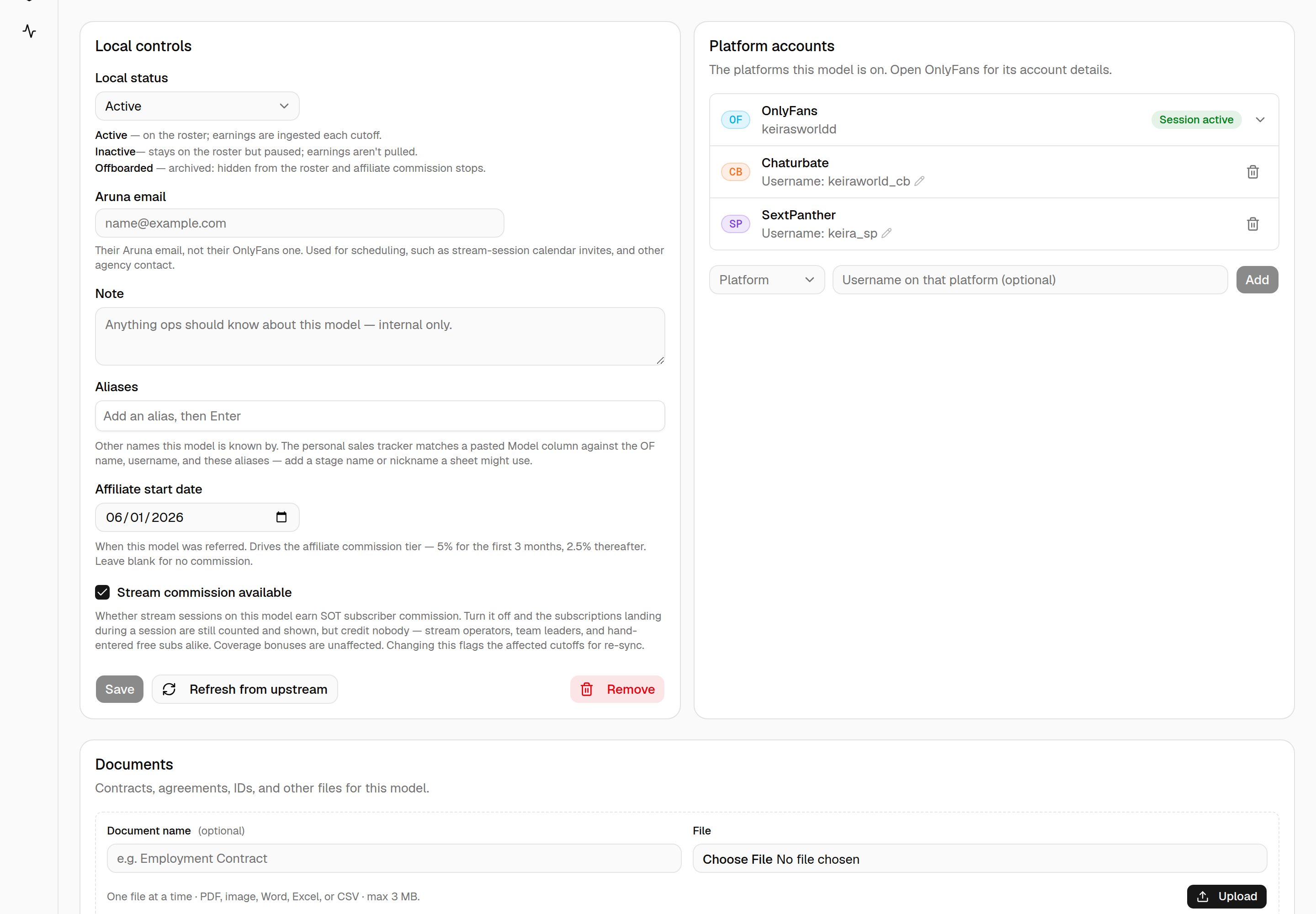
The list of platforms itself is fixed in HRIS — each platform's earnings work differently, so adding a new one is a change to the app, not a setting. Until then, record its income under Other (below).
9. Income
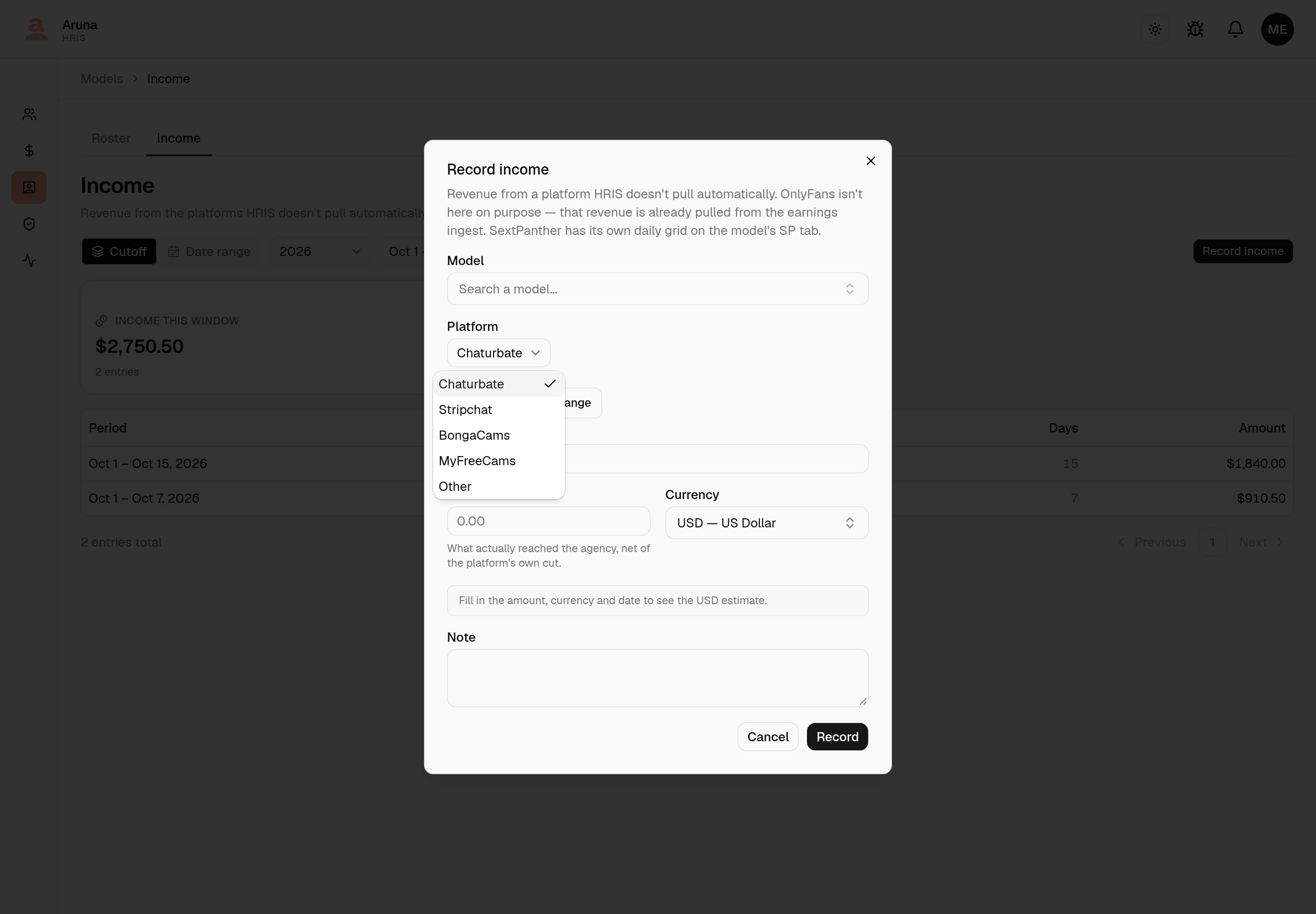
Models → Income is where revenue from the platforms HRIS doesn't pull automatically is recorded by hand, as one amount over a date range: Chaturbate, Stripchat, BongaCams, MyFreeCams, or Other with the platform's name.
Two platforms are deliberately not offered here:
- OnlyFans — its earnings already come in through the ingest, so a manual entry would count them twice.
- SextPanther — its earnings are recorded per day and per category on the model's own SP tab (section 10), because coverage is paid on part of them and a single amount can't say which part.
The page shows the entries in the selected cutoff (or a date range) and the total for that window. An entry covers a date range; one that's wider than the window is counted pro-rata by day.
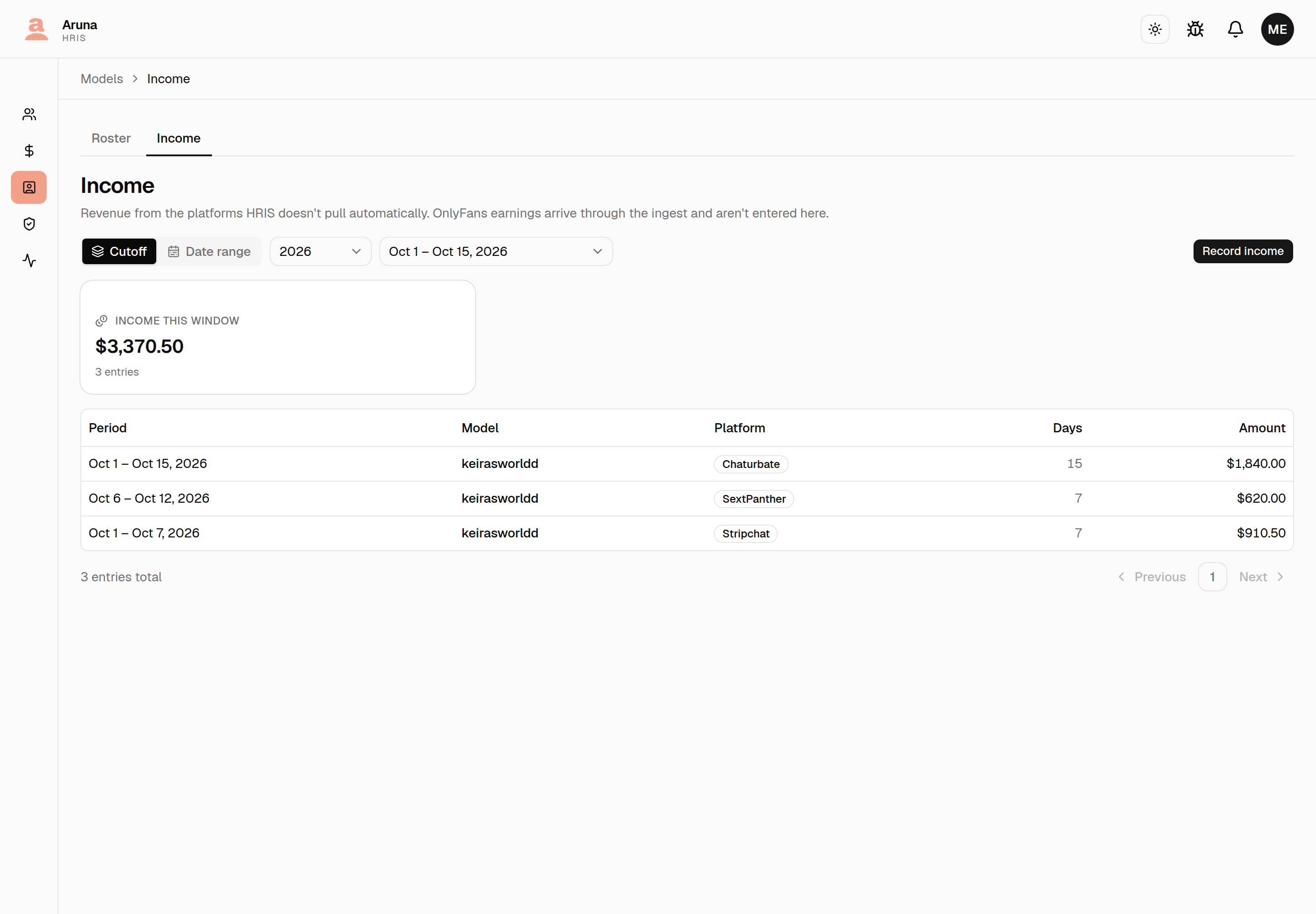
Record income opens the entry form: the model, the platform, a single day or a date range, the amount and its currency (converted to USD at the start date's rate), and an optional note.
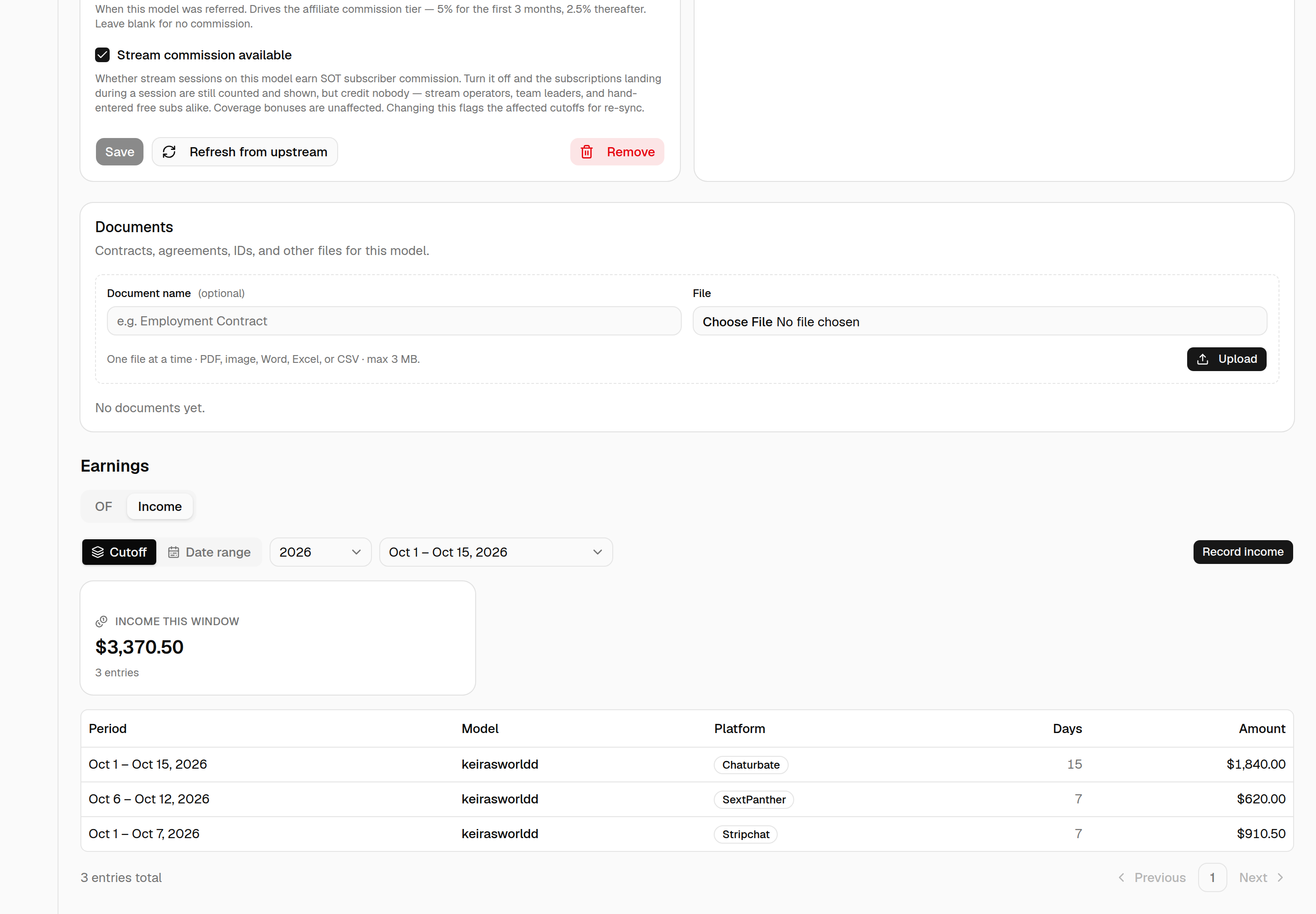
A model's own income is also on its page, under Earnings → Income — the same totals and entries, scoped to that model, with its own Record income. A model without an OnlyFans account only has this tab.
10. SextPanther earnings
SextPanther has no ingest, so its figures are read off SextPanther's own dashboard and typed in. A model with an active SextPanther account gets an SP tab in its Earnings section, beside OF and Income.
The unit is a cutoff — the same one the OF tab and every other earnings surface uses, picked from the dropdown at the top. SextPanther's own dashboard is a month, so copying one means two passes; that's the trade for two tabs on one page meaning the same thing by "this period". The cutoff picker is shared with the OF tab, so switching tabs keeps the period you were looking at.
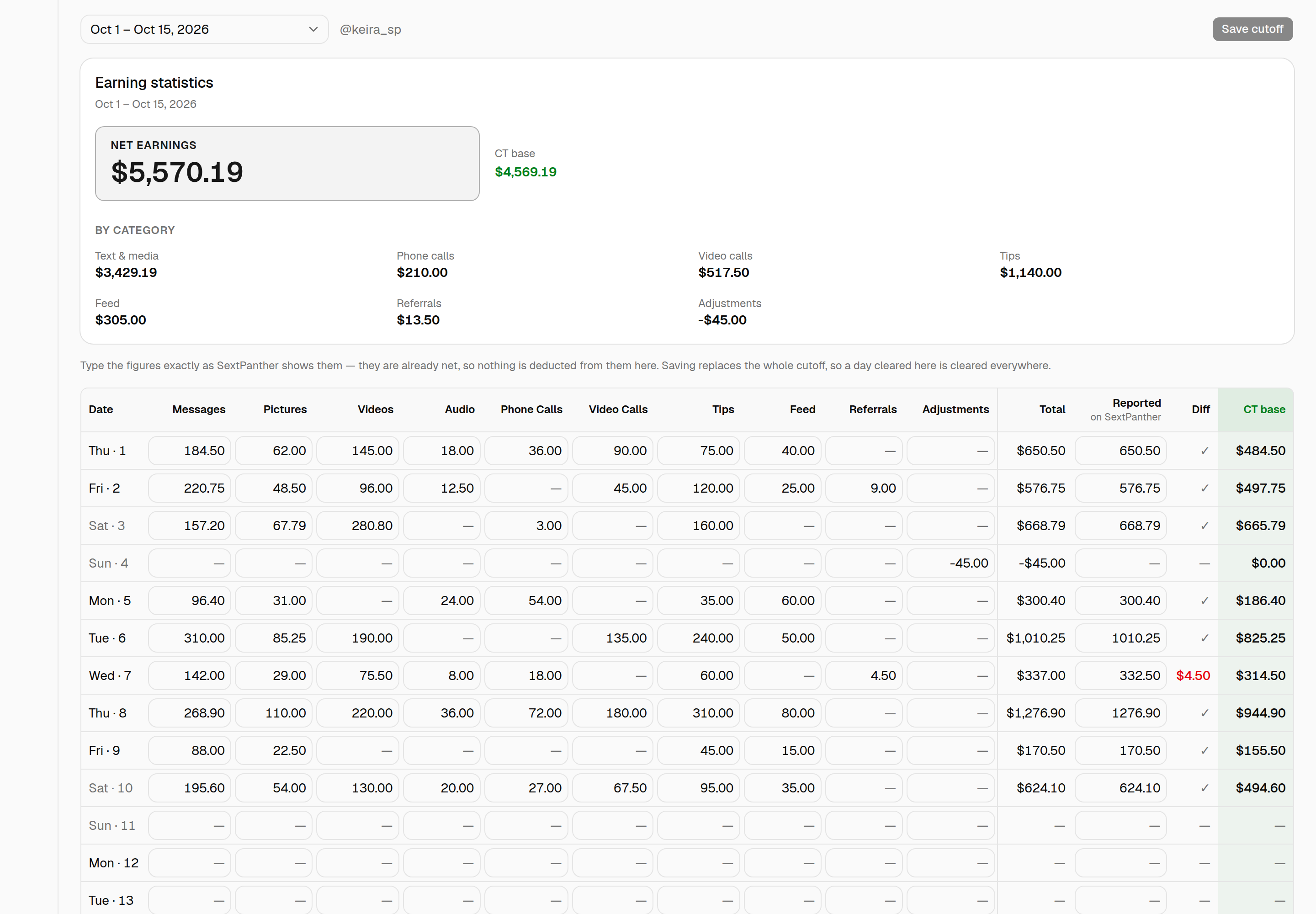
Above the grid is the same Earning statistics card the OF tab has: net earnings, the per-category breakdown, and the CT base — the figure coverage is paid 1.50% of. Those totals come from the server, so the card and the grid's own footer can't disagree.
Pasting a range instead of typing it
Eleven numbers a day, fifteen days a cutoff, is a lot of typing. Paste from SextPanther, beside Save cutoff, takes the text straight off their dashboard: highlight the rows there, copy, and paste them into the box.
It doesn't matter how the text comes out. Dragging a highlight gives one value per line — a bulleted day, the month, then eleven amounts — and copying the rendered table gives tab-separated rows. Both read the same.
• 01
Oct 26
$22.20
$14.61
…
$36.81     ← SextPanther's own total for the row
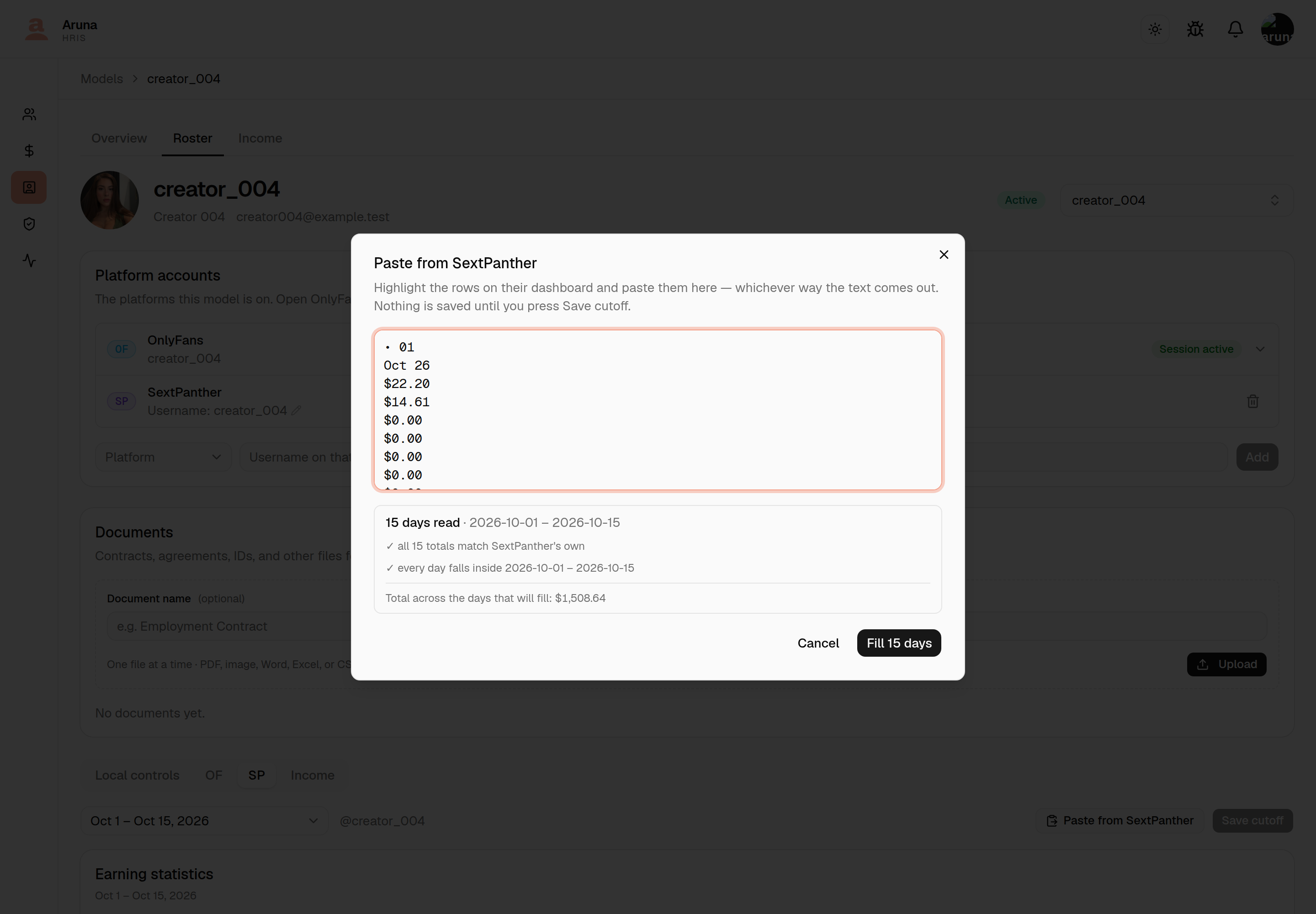
You see what it read before anything moves. The box reports how many days it found, the span they cover, and two checks:
- Do their columns add up to their own total? Each row's last figure is SextPanther's stated total, and it goes into Reported — so the Diff column then checks the paste against their arithmetic. A row that doesn't agree is still filled in, and named, because the disagreement is the thing worth seeing.
- Does every day fall inside this cutoff? Their dashboard is a month and this grid is half of one. Days outside the window are counted and named rather than quietly dropped — switch cutoff and paste again for those.
Anything it couldn't read at all is listed with its line number, and the rest of the paste still comes through.
Fill grid writes the days into the grid, and nothing is saved yet — check them, then press Save cutoff as usual, or Discard to drop the lot. Days the paste didn't mention are left exactly as they were, so pasting one week over a cutoff you'd half-filled doesn't wipe the other.
A pasted $0.00 lands as an empty cell, the same as a day you typed nothing
into — so a pasted cutoff and a typed one look identical afterwards.
Type what SextPanther shows, and that is the figure. Every amount you enter is already net — SextPanther reports what it pays out, so nothing is deducted from it here and no percentage is applied to any column. The right-hand columns are worked out for you:
| Column | What it is |
|---|---|
| Total | The day's ten categories added up |
| Reported | Optional — the day's total as SextPanther itself states it |
| Diff | A tick when the two agree, the difference in red when they don't |
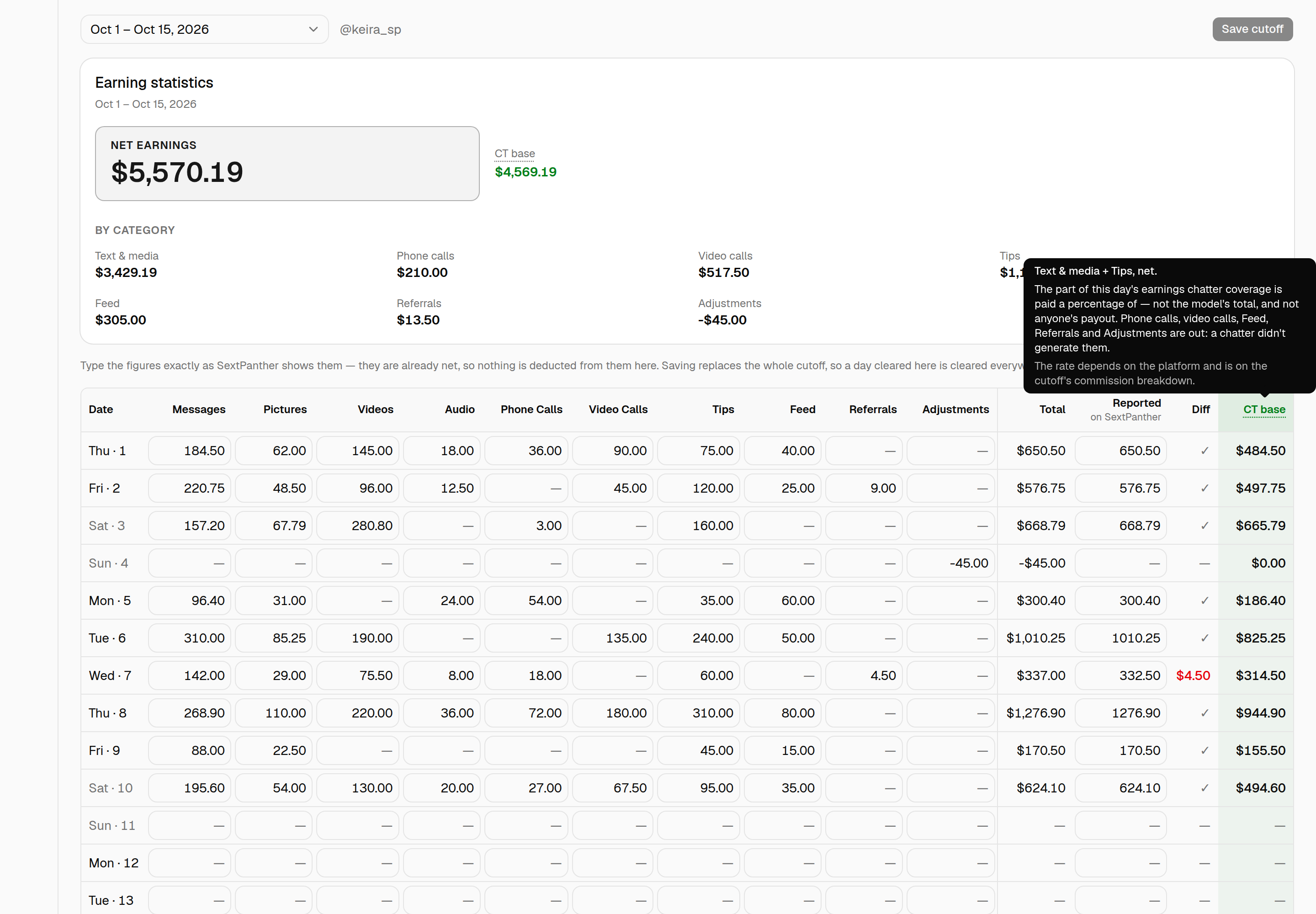
| CT base | Text & media + Tips — what coverage is paid a percentage of |
The row at the bottom of the grid is the cutoff: each category's total, then the window's total and CT base — the same figures as the card above, from the same place.
Hover "CT base" for what's in it. It's the one column that isn't a figure you typed or a sum of them, and the question it raises — why Phone calls and Feed aren't in it — now has its answer on the column itself. The same hover is on the card's CT base and on the OF tab's.
Reported is a checksum, not a figure we use. Fill it in and a mistyped category shows up immediately as a red Diff instead of being found weeks later in a payout. Leave it blank and nothing is checked — that's a dash, not a tick.
Adjustments can be negative. A chargeback or a correction subtracts; it's the one column that takes a minus sign.
Saving replaces the whole cutoff. The grid is the cutoff, so clearing a day's figures and saving removes that day. Only days with something on them are stored — the empty rows are just the calendar.
Notes sit under the grid rather than in it, one per day that has figures.
11. Who entered each figure
Every earnings tab carries an Audit trail: who put a number there, and when. It is the same list in the same shape on all three tabs, because "who recorded this" is one question however the figure arrived.
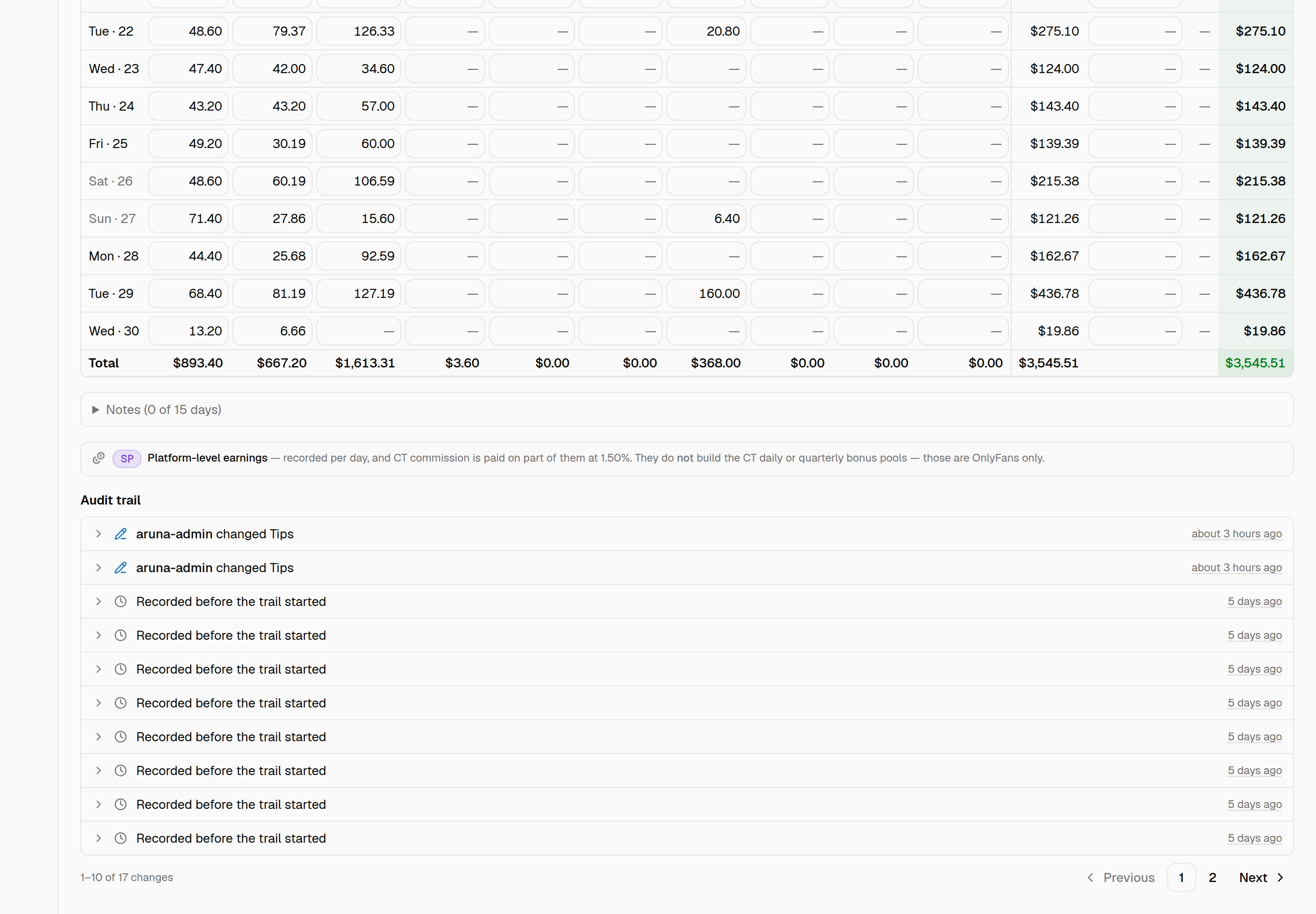
Each entry is one line until you open it — who, what they did, and how long ago. Click a row for the day it covers and the figures that moved.
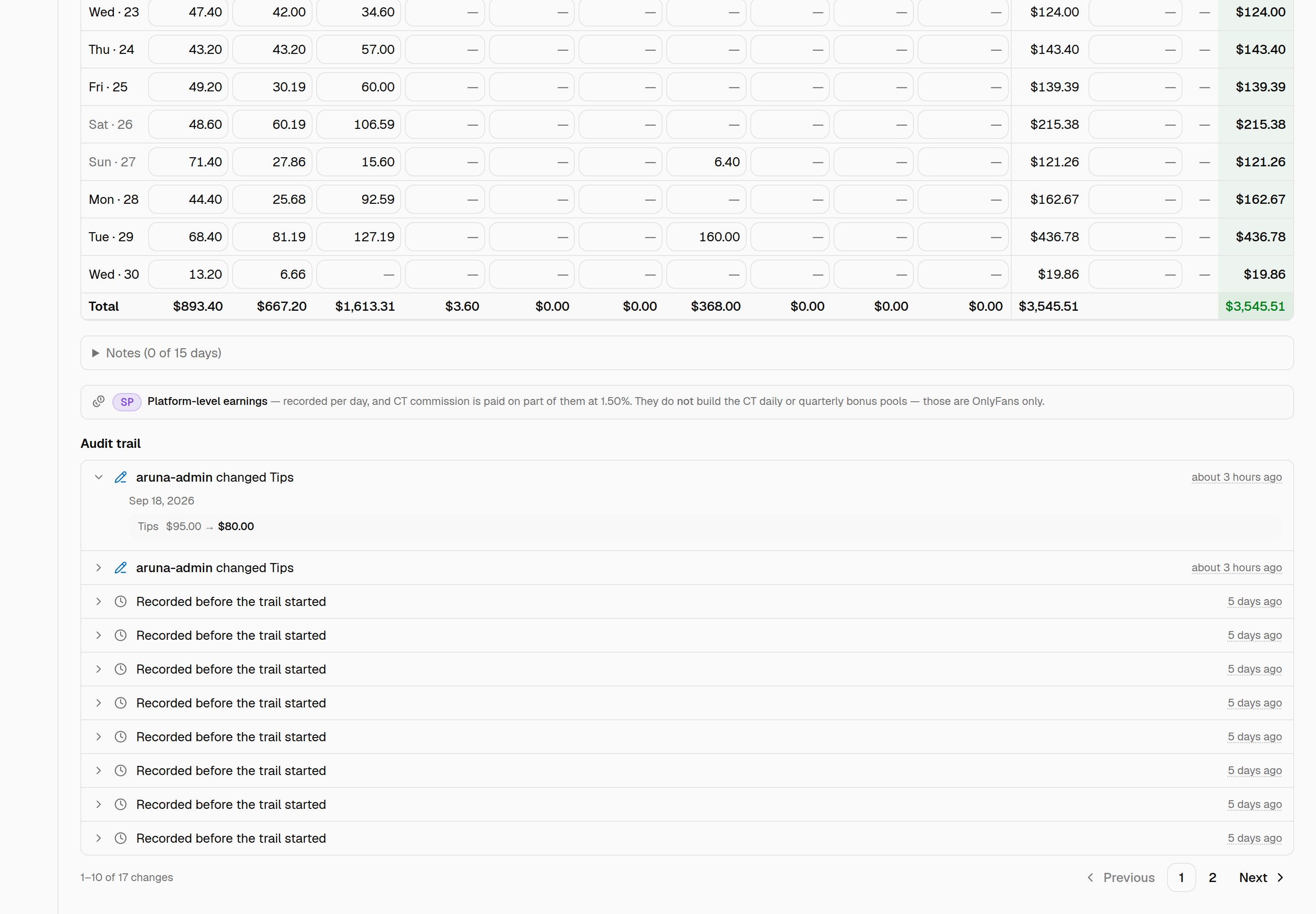
What gets recorded, per tab.
- SextPanther — one entry per day you actually changed. The grid posts the whole cutoff on every save, so an untouched day stays silent: one corrected figure reads as one entry, not thirty. Clearing a day records what it held, which is the only place those figures survive — the row itself is deleted.
- Income — adding, editing and removing a row. A removed row keeps its amount and platform on the entry.
- OnlyFans — nobody types these, so the trail records the fetch: each run, and your name against a Refetch now, Lock or Unlock. It shares the Activity section with the fetch log.

The note above each trail says what that platform's figures are for, because two kinds of revenue live on this page and they behave differently:
- OnlyFans and SextPanther have platform-level earnings, recorded per day, and CT commission is paid on part of them — 3.00% and 1.50%. A wrong figure here is a wrong payout.
- Everything else — Chaturbate, Stripchat, BongaCams, MyFreeCams, Other — is revenue recorded for reporting. No commission and no bonus reads it.
- The one that catches people: SextPanther feeds commission but not the CT daily or quarterly bonus pools. Those are OnlyFans only.
Entries that predate this. Figures recorded before the trail existed read Recorded before the trail started. Their author was never stored anywhere, so it can't be recovered — the history starts from here.
Anyone who can see a model's earnings can see the trail; there's no separate permission, and nothing in it is editable.
12. Launch arm
Every model's record says which setup she started streaming on:
- MTS — she multistreams with Stream Ops from her first stream.
- Independent — she streams on her own, with no operator running it.
SOT runs the two side by side and compares them on performance afterwards. That comparison only works if the arm is recorded before her first stream — once the sessions are all anybody has, a model who switched part-way is indistinguishable from one who was always on the second arm.
You pick it when you add the model. It's required there, and there's no default.
"Not recorded" is not a third arm
A model shows one of three things, and the third is the absence of an answer, not an answer:
| On the record | What it means |
|---|---|
| MTS | She launched multistreaming with Stream Ops |
| Independent | She launched on her own |
| Not recorded | Nobody ever set one |
Every model who was on the roster before this field existed reads Not recorded. It's shown greyed and dashed rather than tinted like the two arms, because counting those models as independent would quietly answer the exact question the field exists to ask.
There's no backfill. If an older model's arm matters to the comparison, somebody has to set it by hand.
Switching it
The arm is editable on the model's detail page, under Launch arm. Change it and save — and every switch is recorded.
Underneath the picker is the Launch arm history: one line per switch, naming who made it, what it moved from and to, and when.
An empty history is the normal case. It reads "Never switched — still on the arm she launched on", which is a fact about her, not a missing record. Adding a model writes no history entry — the arm you picked on the form is her launch arm, and the date she was added says when. So a first entry always means she actually moved.
The one entry that looks like a creation is a model who predated the field getting an arm for the first time. That reads Not recorded → MTS, so it's clear nobody is claiming she moved off an arm she was never on.
Anyone with the Models module can see the history. Nothing in it is editable, and entries are never removed.
What it does and doesn't affect
It doesn't change scheduling. Stream sessions, operator assignments and the SOT Scheduling Hub don't read the arm — setting a model to Independent does not stop anyone being assigned to her sessions, and doesn't warn when they are. The field records what happened so the two arms can be compared; it isn't a control.
It is published on the API. A key with the Model roster scope sees
launch_arm on /models/, and one with Stream sessions sees it on the
model inside each session — so a consumer holding only the schedule can still
group sessions by arm. Empty means not recorded there too; the API publishes
the current arm, not the one in force when a past session ran.
13. Slack routing
Outside tools post about a creator in Slack. Local controls → Slack routing is where you tell them where, and who to mention.
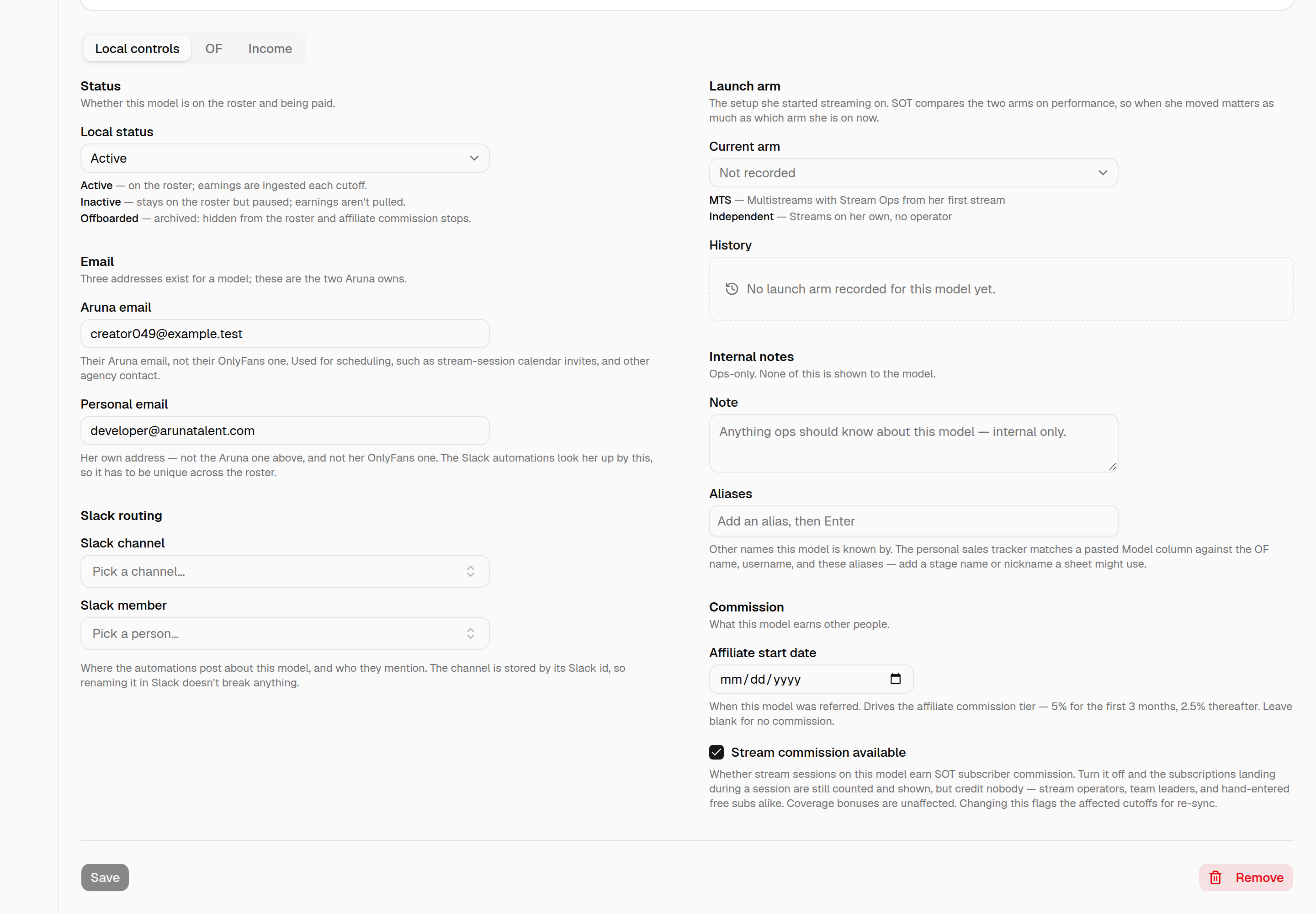
- Personal email — her own address, above the routing block under Email. Not the Aruna one, and not her OnlyFans one. It's one of the two addresses an automation looks her up by, so it has to be unique across the roster — saving one that another creator already has fails and names her.
- Slack channel — where the automations post about this model.
- Slack member — her own Slack account, for a direct mention.
Both pickers search the workspace the HRIS bot can see, so a channel the bot was never invited to won't be listed — see Slack directory.
Nothing here is her OnlyFans email. That lives on her platform account and is refreshed from OnlyFans nightly; the lookup reads it from there rather than keeping a copy that can go stale.
To see every creator's routing at once, and who is still missing a piece, use the Routing lookup page. It edits the same fields.
Troubleshooting
| Problem | What to do |
|---|---|
| A model's earnings look stale | Refetch that cutoff; check Last synced for the real pull time |
| Numbers changed after lock | Locking freezes the pulled figures for the cutoff — refetch before locking if needed |
| Session expired on a model | The account exists but its upstream session dropped — reconnect it upstream before refetching. Don't Replace |
| Account gone on a model | The account isn't listed upstream anymore, so it can't be fetched and the daily ingest skips it. Replace it with the creator's new account |
| The account list doesn't show an account | It's already linked to a model on the roster, or it isn't present upstream |
| Model has no earnings | Expected if it has no OnlyFans account; Refetch/Lock/Last synced stay blank |
| OnlyFans isn't in the income platform list | Deliberate — OnlyFans earnings come from the ingest; a manual entry would double-count them |
| SextPanther isn't in the income platform list | Deliberate — it's recorded per day on the model's SP tab, which carries the categories coverage is paid on |
| A model has no SP tab | It has no active SextPanther account. Add one on Platform accounts |
| A red Diff on a SextPanther day | Our total and SextPanther's don't agree — one of the ten categories is mistyped. Fix the category, not the Reported total |
| A SextPanther day vanished after saving | Saving replaces the cutoff, and a day with nothing on it isn't stored. Re-enter it |
| A SextPanther day isn't on the grid | It's in the other half of the month. Switch cutoff at the top |
| A platform is missing from Platform accounts or Income | The platform list is fixed in the app; record its income under Other with its name until it's added |
| Stream operators paid nothing for a model's sessions | Check Stream commission available on the model — unticked means subs are counted but credit nobody |
| Ticked stream commission back on, pay didn't change | It books on the next Pull/Sync; already-finalized payslips keep their frozen amounts |
| Model not in SOT picker | Check the Username was set; the SOT session picker lists active models by username |
| Account won't attach to a model | It's already linked to another row (the list only offers unlinked accounts) — delete that row first, or use it directly |
| Detach is blocked | That account has locked cutoffs or ingested earnings — detach only works while it has none. Another of her accounts having earnings doesn't block it. If the creator moved to a new OnlyFans account, use Replace instead |
| A model shows two OnlyFans rows | She runs two accounts. Both are fetched nightly and her totals are the sum; the starred one is the account she's named after |
| Locked the cutoff but she's still showing as unlocked | With two OnlyFans accounts each locks separately — check the account picker in Earnings and lock the other one too |
| Renamed a model by switching Primary, want it back | Make primary on the original account. The name you left is kept as an alias either way, so nothing that resolves by it broke |
| Refetch says the earnings came from a previous account | The model's account was replaced; that cutoff predates the change and can't be re-pulled. Lock now seals it as-is, or Undo the change if it was a mistake |
| Replaced with the wrong account | Undo on the "Account replaced on…" note — works until the new account pulls earnings |
| Add model won't submit | A Launch arm has to be picked — there's no default. See Launch arm |
| An old model's launch arm says Not recorded | Expected — she predates the field, and there's no backfill. Set it by hand if she's in the comparison. It is not the same as Independent |
| A model's launch arm history is empty | She's still on the arm she launched on. Adding a model writes no entry — a first entry always means a real switch |
| Set an operator-free model to Independent, but she's still being scheduled | Expected — the arm records what happened, it doesn't gate scheduling. Nothing stops an assignment |